
Do it in OpenCV: M1: Fix a badly exposed photo, M2: Find every ball on a pool table
Before this unit: Image sensing
File Formats: What the Encoder Did Before You Read the Pixels
Lesson 6 of The Image as Data. A JPEG quality sweep costs almost nothing in PSNR and takes Canny's edge agreement from 0.949 to 0.895. Chroma subsampling saves 40% of the bytes for 0.09 of ΔE. And OpenCV and Pillow decode every JPEG here bit-for-bit identically; the disagreement is a 16-bit PNG, which Pillow silently opens as 8-bit.

An image file is a way of writing the pixel numbers down, and lossy formats save space by throwing away detail you are unlikely to miss. Below, a close crop of the colour chart saved as JPEG from quality 95 down to 5, with the size of each file.
You choose this trade-off more often than you think:
- “Save for web” and export dialogs with a quality slider.
- Messaging apps that recompress every photo you send.
- Datasets stored as JPEG: the model trains on the artefacts along with the scene.
TL;DR: dropping a JPEG from q95 to q25 costs under 4 dB of PSNR and takes Canny’s edge agreement from 0.949 to 0.895: the pixels barely move and a tenth of the edge structure goes. Chroma subsampling saves 40% of the bytes for 0.09 of ΔE. And the folklore is wrong: OpenCV and Pillow decode every JPEG here bit-for-bit identically. The one place they disagree is a 16-bit PNG, which Pillow silently hands back as 8-bit.
Where we are
Part of The Image as Data. The unit so far has been about an array in memory: its shape, the grid it was sampled on, how finely each sample is written, what coordinates its three numbers live in and how far those are from the real colour. This lesson is about the last thing that happens before any of that reaches you: something wrote the array to a file, and most of the time it did not write all of it.
The sweep below runs on our own 8-bit development of the unit’s frame, so generation one of the loss is ours and there is no earlier encoder to blame.
What an encoder throws away
JPEG cuts the image into 8 × 8 blocks, rewrites each block as a sum of patterns from smooth to fine, and then rounds the fine ones hard, because the eye notices them least. That rounding is the quantization of lesson 3 applied to frequency coefficients instead of pixels. Quality is a scale factor on how hard [2].
The sweep
Nine encodings of the same 12.4-megapixel frame. The last column is the one nobody publishes: the F1 agreement between Canny’s edge set on the decoded image and on the source, at unit 3.1’s own thresholds, with one pixel of tolerance.
| encoding | bytes | ratio | PSNR (dB) | patch ΔE mean / max | edge F1 |
|---|---|---|---|---|---|
| PNG | 10,072,194 | 3.7× | — | 0 / 0 | 1.000 |
| WebP lossless | 7,964,614 | 4.7× | — | 0 / 0 | 1.000 |
| WebP q82 | 79,282 | 468× | 45.22 | 0.35 / 0.80 | 0.946 |
| AVIF q82 | 185,542 | 200× | 45.81 | 0.69 / 1.18 | 0.973 |
| JPEG q95 | 1,165,636 | 31.8× | 46.52 | 0.17 / 0.30 | 0.949 |
| JPEG q85 | 349,108 | 106× | 45.16 | 0.26 / 0.49 | 0.933 |
| JPEG q75 | 268,262 | 138× | 45.02 | 0.36 / 0.70 | 0.928 |
| JPEG q50 | 234,343 | 158× | 43.98 | 0.53 / 1.10 | 0.926 |
| JPEG q25 | 214,922 | 173× | 42.60 | 1.11 / 2.39 | 0.895 |
What it means, and the first thing is a warning about the table itself. Those compression ratios are not a fact about the encoders, they are a fact about this photograph: nine tenths of the frame is a dark room and near-black compresses to almost nothing. Measured on the content crop instead (the lamp, the chart and the lit table), JPEG q95 is 23.4× rather than 31.8×, and q25 is 145× rather than 173×. Any compression ratio quoted without saying what was in the picture is close to meaningless.
The two lossless rows are the check that the edge metric works: both decode byte-identically and both score exactly 1.000.
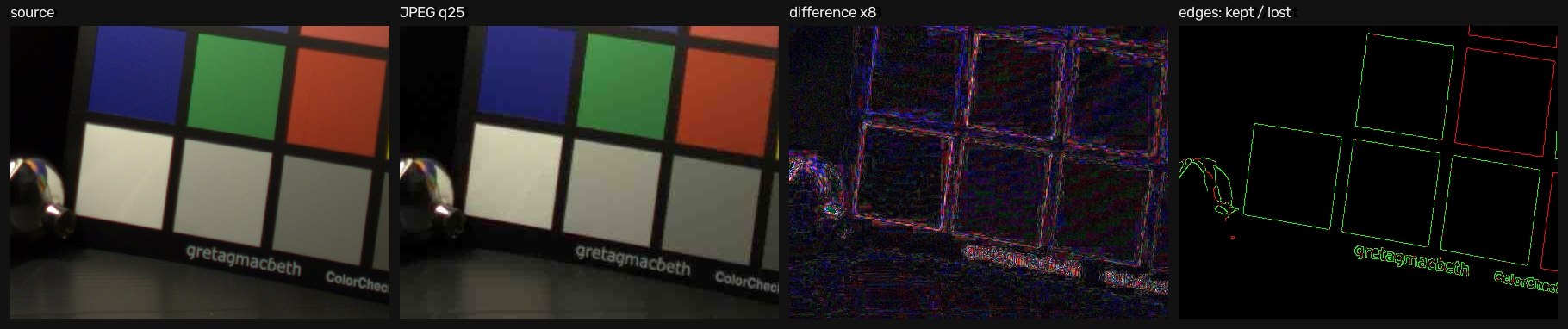
Then the finding. From q95 to q25 the PSNR falls by less than 4 dB and the mean patch colour moves by about one ΔE, both of which sound like nothing. Over the same range edge agreement falls from 0.949 to 0.895: at q25 about one edge pixel in ten no longer matches the source, against one in twenty at q95. Fine detail is cheap to discard and expensive to lose, and that is the trade.
AVIF is worth a line: at nominally the same quality setting it keeps the most edges (0.973) while costing more bytes than WebP. Quality numbers are not comparable across codecs (q82 means a different thing to each encoder), so read the columns and ignore the labels.
Chroma subsampling, isolated
Same image, same quality, one setting changed: whether the two colour-difference channels are kept at full resolution or at half in each direction.
Two decoders, one file
The often-repeated claim is that OpenCV and PIL can decode the same file differently. Measured across four JPEG qualities, both sampling factors, an 8-bit PNG and a WebP:
| case | OpenCV | Pillow | identical |
|---|---|---|---|
| JPEG q95, q85, q50, q25 (4:2:0) | uint8 | uint8 | yes, bit for bit |
| JPEG q85 (4:4:4) | uint8 | uint8 | yes |
| PNG 8-bit | uint8 | uint8 | yes |
| WebP q82 | uint8 | uint8 | yes |
| PNG 16-bit | uint16, range 625–53,427 | uint8, range 2–208 | no |
What it means: seven of eight cases agree to the last bit. The JPEG cases agree
because both libraries decode with libjpeg-turbo here (OpenCV 5.0.0’s wheel builds its
own copy). The disagreement is a type rather than arithmetic. Pillow opens the 16-bit
PNG in mode RGB and hands back 8-bit samples: it has dropped the low eight bits of
every value, with no error and no warning. That undoes what
the bit-depth lesson spent its time earning,
and it is the version of this folklore worth carrying around.
import cv2, numpy as np
from PIL import Image

cv2.imwrite("depth.png", sixteen_bit)          # uint16, three channels

opencv = cv2.imread("depth.png", cv2.IMREAD_UNCHANGED)
pillow = np.array(Image.open("depth.png"))
print(opencv.dtype, opencv.max())              # uint16 53427
print(pillow.dtype, pillow.max())              # uint8   208   <- eight bits gone
// OpenCV has the same trap under a different name. IMREAD_COLOR is imread's
// default flag, and it converts a 16-bit PNG to 8-bit (the top byte of each value)
// without a warning. Ask for the depth explicitly.
cv::Mat kept = cv::imread("depth.png", cv::IMREAD_UNCHANGED); // CV_16UC3
cv::Mat lost = cv::imread("depth.png"); // CV_8UC3, silentlyThe same silent conversion happens in Python: a bare cv2.imread("depth.png") also
returns uint8, which is why the snippet above passes cv2.IMREAD_UNCHANGED.
One more thing the file carries: orientation. This frame’s EXIF says
Horizontal (normal), so nothing here rotates. On a file whose flag says “rotate 90°”,
the libraries disagree. Checked on OpenCV 5.0.0 and Pillow 12.3.0 with a 60 × 40 JPEG
tagged orientation 6: cv2.imread with its default flag applies the rotation and
returns a 40-wide, 60-tall array; cv2.IMREAD_UNCHANGED (or
IMREAD_IGNORE_ORIENTATION) ignores it and returns 60 wide; and
np.array(Image.open(...)) ignores it too unless you call ImageOps.exif_transpose
first. Mix the two libraries in one pipeline and the same file arrives in two shapes,
with nothing downstream complaining.
Now you try
The encoding below is real: the browser’s own encoder runs on a real crop and the kilobytes are actual bytes. Turn on the difference view and drop the quality from 95.
The browser’s encoder is not the one that produced the table above, so its byte counts will not match. Read the lab for the shape of the trade and the table for the numbers.
In the wild
The lab frame said JPEG’s cost lands on edges. A page of dense text says something sharper, and it contradicts what most people expect.
A Rijksmuseum scan of an 1814 Amsterdam newspaper, 900 × 900 pixels of body text:
| quality | bytes | PSNR | edge F1 | error on blank paper | error beside the letters |
|---|---|---|---|---|---|
| 95 | 261,467 | 45.09 | 0.998 | 0.92 | 1.54 |
| 85 | 141,881 | 41.08 | 0.996 | 1.35 | 2.80 |
| 75 | 104,685 | 39.16 | 0.995 | 1.65 | 3.50 |
| 50 | 68,533 | 36.85 | 0.993 | 2.18 | 4.67 |
| 25 | 43,314 | 34.15 | 0.988 | 2.85 | 6.43 |
What it means, and it is not what the lab frame predicted. The letters are fine. Edge agreement holds at 0.988 all the way down to q25, against 0.895 for the lab scene at the same quality. High-contrast strokes are the easiest thing in the world for a block-transform codec to keep.
What degrades is the paper. Blank paper far from any ink picks up an RMS error of 2.85 by q25; the blank paper immediately beside a letter picks up 6.43, more than twice as much. That is ringing: the encoder cannot represent a hard edge in a few cosine terms, so it spreads a halo onto the white space next door.
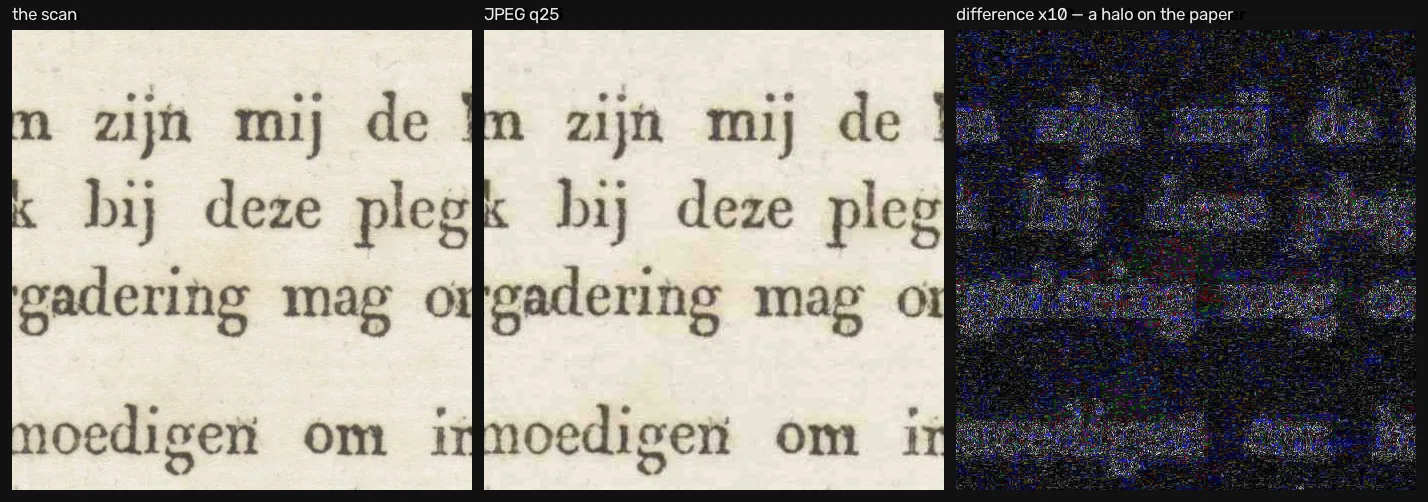
So the rule is narrower than “JPEG hurts edges”. It hurts the neighbourhood of an edge, in proportion to the contrast of that edge. That is why the lab scene’s soft patch boundaries lost their edges outright while this page’s hard ones did not, and why OCR on a heavily compressed scan fails on the spaces between letters rather than on the letters.
Where this breaks
No detector was run. Edge agreement is a proxy, chosen because unit 3.1 already publishes the code and thresholds, and nothing here is a statement about mAP or about any model’s accuracy. If you want that number, it needs a model, a dataset and several configurations, and this is a fundamentals lesson rather than a benchmark.
One photograph is one photograph, and a lab scene of flat chart patches is unusually friendly to a block-transform codec. A landscape full of foliage would lose far more at q75 than this frame does. The edge metric also carries a one-pixel tolerance, which is a choice: with zero tolerance every score drops, because a contour that shifted by a pixel counts as both a miss and a false positive.
And every number here is OpenCV 5.0.0’s encoders. A different libjpeg build, or
mozjpeg, would produce different bytes for the same quality setting.
Next
This is the last lesson in the unit. The array is now fully accounted for: where its samples sit, how finely they are written, what their three numbers mean, how far those numbers are from the light in the room, and what the file did to all of it. Back to the unit hub, or on to what you do to the array once you have it.
Further reading
- Go deeper: Gonzalez & Woods, Digital Image Processing (4th ed.), §8.9 (Block Transform Coding, p. 632), whose JPEG subsection is on p. 644 [1]; §8.1’s Image Formats, Containers, and Compression Standards (p. 607) is the map of the whole landscape.
- The standard itself: Wallace’s overview paper [2] is still the clearest short description of the JPEG pipeline; ITU-T T.81 [3] is the normative text.
- Related on CondadosAI: what an edge detector reads, the thresholds this lesson borrows · bit depth, which the 16-bit PNG trap quietly undoes.
References
[1] Gonzalez, R. C., & Woods, R. E. (2018). Digital Image Processing (4th ed.), §8.1 (Fundamentals, p. 596), incl. Image Formats, Containers, and Compression Standards (p. 607), and §8.9 (Block Transform Coding, p. 632), incl. JPEG (p. 644). Pearson. Detailed table of contents.
[2] Wallace, G. K. (1992). The JPEG still picture compression standard. IEEE Transactions on Consumer Electronics, 38(1), xviii–xxxiv. doi:10.1109/30.125072
[3] ITU-T (1992). Recommendation T.81: Information technology — Digital compression and coding of continuous-tone still images — Requirements and guidelines. Recommendation
[4] Fairchild, M. D. (2007). The HDR Photographic Survey. Proceedings of the IS&T 15th Color and Imaging Conference, pp. 233–238. doi:10.2352/CIC.2007.15.1.art00044. The scene this unit measures. Used for research and non-commercial publication, as its terms require; images are downloaded, never redistributed.