Why it works: Unit 1.3: The image as data
Find Every Ball on a Pool Table with OpenCV
The second OpenCV in Practice project: find the balls on a pool table by the one colour they are not, the cloth, and score the result ball by ball against a hand count on three photos. 29 of 41 found with 2 false alarms; 9 of the 12 misses are touching another ball.
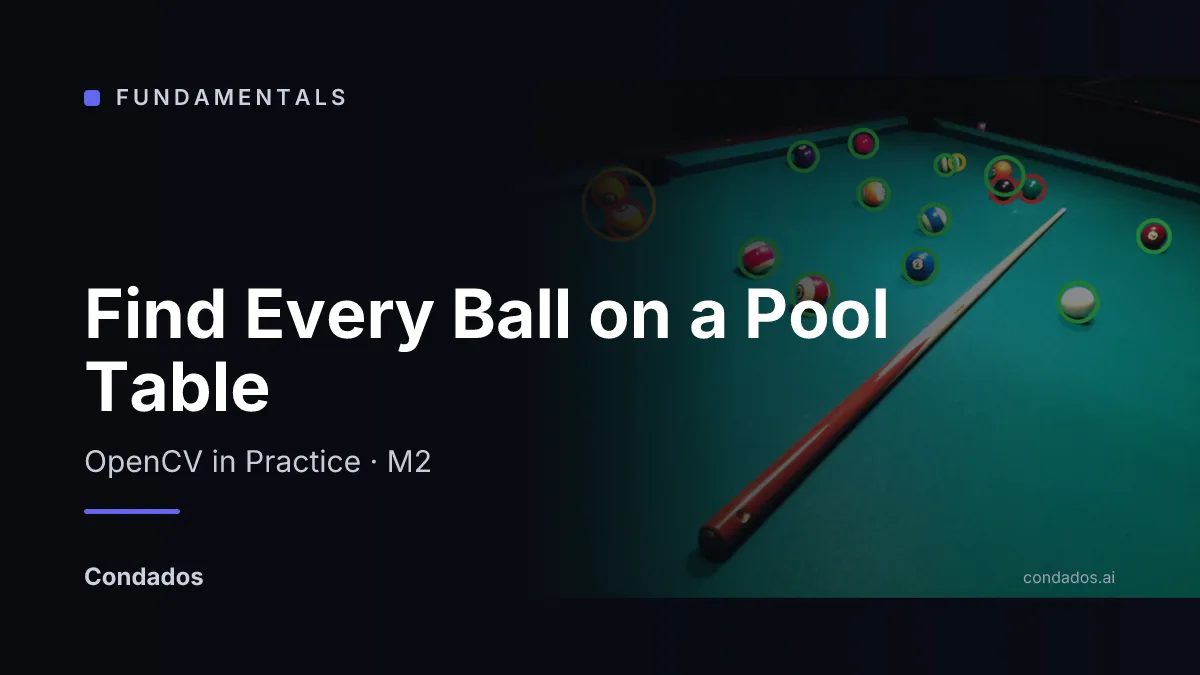
A few lines of OpenCV can find most of the balls on a pool table by looking for everything that is not the colour of the cloth, and this project counts how many they find and which ones they miss.
The animation runs the pipeline one step at a time on one photo, then shows the finished result on all three photos of the module, with found balls ringed green, missed balls red and false alarms yellow.

pool.webp, then the result on each photo. Photos “Billiards table 2.JPG”, “Billiards table 1.JPG” and “Billiards Table.JPG” by MarkBuckawicki, CC0 [1].- Read the colours in HSV. Convert the photo so each pixel’s colour (hue) is one number and its brightness another; the cloth is one hue in light and in shade (lesson 1).
- Mask the cloth. Mark every pixel whose hue, saturation and brightness fall inside the cloth’s range [2] (lesson 2).
- Find the table. The largest region of cloth, stretched over its notches and pulled in off the cushions, is the table; the room outside it is ignored (lesson 4).
- Clean what is not cloth. Inside the table, everything that is not cloth is a candidate; shrinking and regrowing the white areas removes specks and fills holes [2] (lesson 3).
- Keep round, lit blobs. Trace each candidate’s outline and keep it if it is round enough to be a ball and has a highlight, which a pocket does not (lessons 4 and 5).
Where you have met it: Analyze Particles in ImageJ, which counts cells or grains by size and circularity; the chroma key filter in OBS and video editors; optical sorters that reject grains and fruit by colour.
TL;DR. Finding balls by the colour of the cloth works for balls standing apart and fails for balls that touch each other or share the cloth’s colour, so it is a quick first tool whose count needs checking. On three photos with 41 balls it finds 29 with 2 false alarms; of the 12 it misses, 9 are touching another ball, 2 are green balls on green cloth and 1 is lost to its shadow.
The photos and the hand count
The module works on three photos of the same table taken on the same evening from three positions, placed in the public domain by their author [1]. Every ball resting on the cloth was located by hand on zoomed crops, as a centre and a radius in the 960-pixel-wide published file. A ball on top of the far rail in pool-wide is off the cloth and was left out.
| File | Balls on the cloth | What makes it hard |
|---|---|---|
pool.webp | 15 | a green ball beside a black one, a green-striped ball, two yellow balls touching at the rail |
pool-close.webp | 12 | two balls close to the lens with long shadows, two touching pairs |
pool-wide.webp | 14 | small balls, a cluster of three, a pair at the rail, a green ball |
A ball counts as found when a kept blob’s centre falls inside its outline. Each ball and each blob can be matched once, closest pairs first, so a blob sitting between two touching balls scores one false alarm and two misses.
The whole pipeline, run on all three photos
import cv2
import numpy as np

def objects_on_table(hsv, v_min):
    cloth = cv2.inRange(hsv, (75, 80, v_min), (100, 255, 255))
    cs, _ = cv2.findContours(cloth, cv2.RETR_EXTERNAL,
                             cv2.CHAIN_APPROX_SIMPLE)
    hull = cv2.convexHull(max(cs, key=cv2.contourArea))
    table = cv2.fillPoly(np.zeros_like(cloth), [hull], 255)
    table = cv2.erode(table, np.ones((19, 19), np.uint8))
    obj = cv2.bitwise_and(cv2.bitwise_not(cloth), table)
    k5, k7 = np.ones((5, 5), np.uint8), np.ones((7, 7), np.uint8)
    obj = cv2.morphologyEx(obj, cv2.MORPH_OPEN, k5)
return cv2.morphologyEx(obj, cv2.MORPH_CLOSE, k7)def find_balls(img, v_min=10, pocket_v=60):
hsv = cv2.cvtColor(img, cv2.COLOR_BGR2HSV)
obj = objects_on_table(hsv, v_min)
cs, _ = cv2.findContours(obj, cv2.RETR_EXTERNAL,
cv2.CHAIN_APPROX_SIMPLE)
balls = []
for c in cs:
a, p = cv2.contourArea(c), cv2.arcLength(c, True)
blob = cv2.drawContours(np.zeros_like(obj), [c], -1, 255, -1)
brightest = hsv[..., 2][blob > 0].max()
round_ = a >= 45 and 4 * np.pi * a / p**2 > 0.55
if round_ and brightest >= pocket_v:
balls.append(cv2.minEnclosingCircle(c)[0])
return ballsimport json
labels = json.load(open("labels.json"))
def score(balls, truth):
pairs = sorted((np.hypot(bx - x, by - y), i, j)
for i, (x, y, r) in enumerate(truth)
for j, (bx, by) in enumerate(balls))
hit_t, hit_b = set(), set()
for d, i, j in pairs:
if i not in hit_t and j not in hit_b and d < max(truth[i][2], 8):
hit_t.add(i)
hit_b.add(j)
return len(hit_t), len(balls) - len(hit_b)
for n in ["pool", "pool-close", "pool-wide"]:
found, false = score(find_balls(cv2.imread(f"{n}.webp")), labels[n])
print(f"{n:11} {found:2} of {len(labels[n])}, {false} false")pool 11 of 15, 2 false pool-close 9 of 12, 0 false pool-wide 9 of 14, 0 false
out = cv2.imread("pool.webp")
for x, y in find_balls(out):
    cv2.circle(out, (int(x), int(y)), 24, (0, 255, 0), 3)
cv2.imshow("pool.webp: what the pipeline kept", out)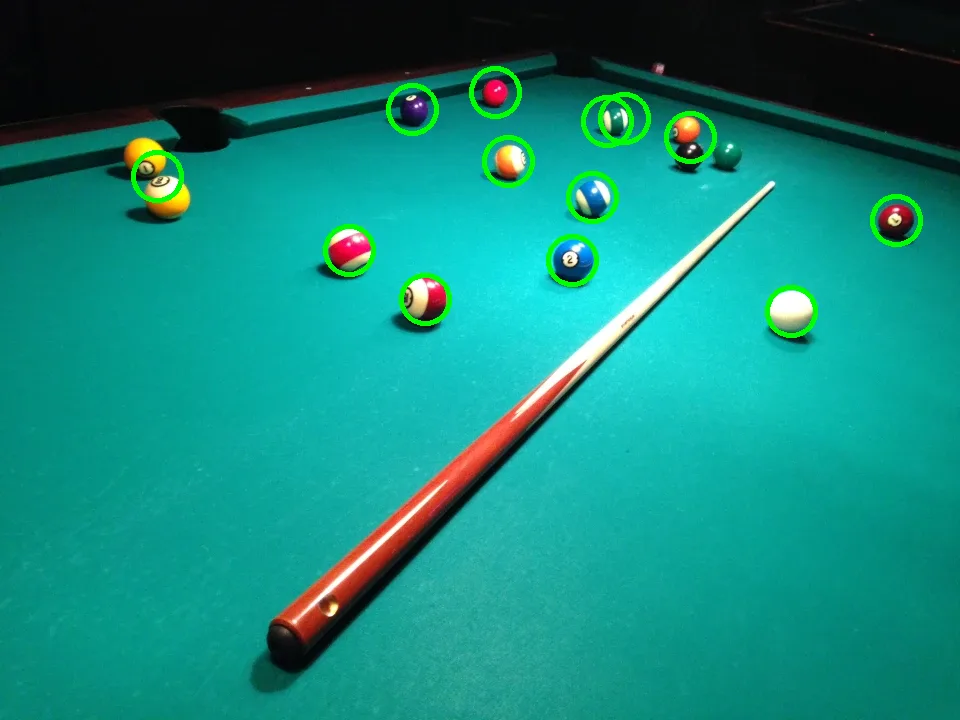
What each step of the fix gets
The pipeline was built in three stages, each adding one change to the one before (lesson 5). Found of total, false alarms in brackets:
| Stage | pool | pool-close | pool-wide | Total |
|---|---|---|---|---|
| first attempt (brightness floor 40) | 10 of 15 (1) | 8 of 12 (1) | 9 of 14 (1) | 27 of 41 (3) |
| + reject blobs with no highlight | 10 of 15 (1) | 8 of 12 (0) | 8 of 14 (0) | 26 of 41 (1) |
| + brightness floor 10 | 11 of 15 (2) | 9 of 12 (0) | 9 of 14 (0) | 29 of 41 (2) |
- The highlight test removes both pockets. A pocket’s brightest pixel is at most 45 on the 0–255 scale, and the dimmest highlight on a real ball is 144. The found count also drops by one, because the “ball” it removes in
pool-widewas the invisible green ball’s shadow. - The lower floor recovers five balls and loses two. Four of the five sit where the cloth is darker than 40, at the far end or along the rail, and were joined to that dark strip. The two lost are a ball close to the camera whose shadow now half-joins it and one of a touching pair. It also turns the two yellow balls at the rail in
pool.webpinto one false alarm. - The floor is a small effect. Across floors from 0 to 40, with the highlight test on, the total moves by three balls:
| Brightness floor | 0 | 5 | 10 | 20 | 30 | 40 |
|---|---|---|---|---|---|---|
| Found of 41 | 28 | 28 | 29 | 28 | 27 | 26 |
| False alarms | 3 | 2 | 2 | 2 | 2 | 1 |
10 was chosen for a reason given in lesson 1 (below about 10, hue is noise), and it happens to be the best column. With three photos, the difference between 28 and 29 is one ball.
Where it fails
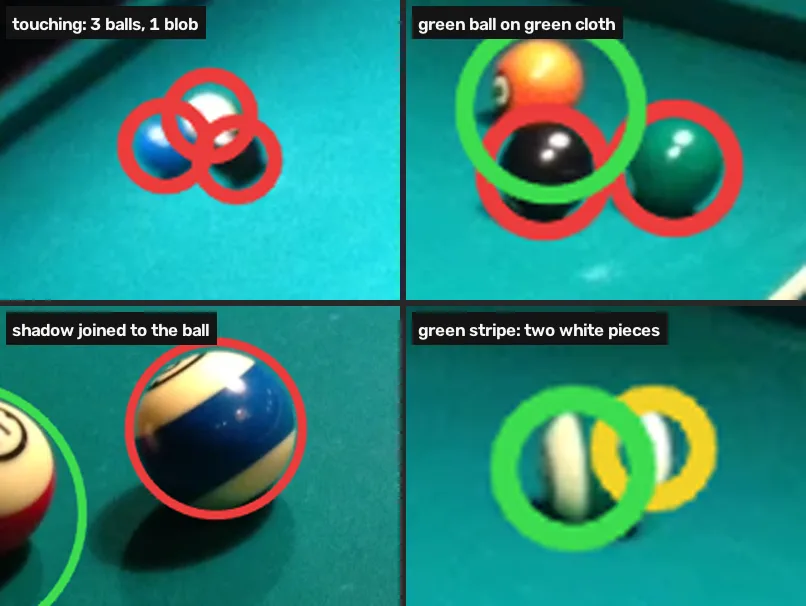
| Why the ball was missed | Balls |
|---|---|
| touching another ball: the pair or cluster is one blob | 9 |
| the colour of the cloth: green ball on green cloth | 2 |
| a shadow darker than the floor still joins the ball | 1 |
| total missed | 12 of 41 |
The false alarms are one of each kind that colour produces: a blob between two touching balls, and the second white piece of a green-striped ball.
What to take from it
- Objects that stand apart on a plain background of one colour: this pipeline is enough. Every ball it misses but three is touching another ball.
- Objects that touch: colour cannot separate them; 9 of the 12 misses are that. Split blobs by shape, with a distance transform or circle detection, which the next module does on coins [3]. If your objects cluster the way balls do after a break, expect to miss more than one in four with colour alone (12 of 41 here).
- An object the colour of the background: no colour threshold finds it. Change the lighting, the background or the camera, or use something that looks at shape.
- Measure before you trust it. The first attempt looked fine on one photo and missed 14 of 41 balls across three. Counting took a few minutes per photo.
- When a model is worth it: this module did not test a learned detector. The number to beat is 29 of 41 with 2 false alarms, and the balls a detector would have to add are touching ones.
Limitations
- The settings were tuned on the photos they are scored on. Every range, kernel and threshold was chosen while looking at these three photos, so 29 of 41 is a best case. The held-out test is your own photo: “Use your image” on the first cell of lesson 4, then Run on its last cell, draws what the pipeline keeps. A cloth of another colour needs its own hue range.
- Three photos, 41 balls, one table. One ball is 2.4 percentage points. The same cloth, room, lights and camera appear in all three; a blue or red cloth, or daylight, needs a new range.
- One person placed the labels. Centres and radii were placed by hand on zoomed crops. The two balls inside the red-and-orange pair in
pool-widewere separated by eye at the full 2048-pixel resolution. - The match rule is generous on purpose. Any kept blob whose centre lands inside a ball’s outline counts; at the first stage that credited a shadow as the green ball.
- “On the table” is a definition. The ball on top of the far rail in
pool-widewas left out; counted, it would be a 42nd ball and a 13th miss. - The inputs are WebP at quality 90, resized from the 2048-pixel originals. Every number is computed on the published files, so a reader’s Run reproduces it.
The lessons
- Find the HSV Range of an Object in OpenCV
- Make a Color Mask with cv2.inRange in OpenCV
- Erode, Dilate, Open and Close a Mask in OpenCV
- Find, Measure and Filter Contours in OpenCV
- Where Color Detection Fails in OpenCV
Every cell of the module is also in one notebook, to run on your own machine with the OpenCV pip installs: open it in Colab. Its outputs match the page’s, cell for cell.
How these numbers were made
| Data | Wikimedia Commons, by MarkBuckawicki, CC0 1.0 [1]: “Billiards table 2.JPG” (pool.webp), “Billiards table 1.JPG” (pool-close.webp), “Billiards Table.JPG” (pool-wide.webp); 2048×1536 originals, SHA-1 checked against Commons and SHA-256 recorded in the asset registry |
| Preparation | resized to 960×720 with INTER_AREA, written as WebP quality 90 |
| Labels | 41 ball centres and radii placed by hand on zoomed crops, in the 960-pixel frame: output/practice_m2_labels.json, published as /practice/m2/labels.json |
| Scoring | a kept blob matches a ball when its centre is closer than the ball’s radius (at least 8 px); matches assigned closest first, one to one |
| Settings | hue 75–100, saturation ≥ 80, brightness floor 40 (first attempt) or 10 (final); table eroded 19×19; opening 5×5, closing 7×7; area ≥ 45 px, roundness > 0.55; highlight test: brightest value ≥ 60 |
| In the page | Pyodide 314.0.7, OpenCV 4.11.0, NumPy 2.4.6 (every cell’s shown output is rendered by npm run pycells with this build) |
| Locally | OpenCV 5.0.0, NumPy 2.5.2, Python 3.12.9; every number above matches the page’s |
| Machine | Intel Core i7-12700H, Ubuntu 22.04.5 LTS. Nothing is timed; the numbers are deterministic |
| Commands | uv run practice-m2 --assets --media in fundamentals-lab with the originals in data/pool/; npm run pycells in the site repo |
| Artifact | output/practice_m2_numbers.json |
Further reading
- Gonzalez & Woods, Digital Image Processing, chapter 7 on colour and chapter 9 on morphology [2], for the theory behind steps 1 to 4.
- OpenCV’s watershed tutorial [3], which separates touching coins with a distance transform: the next tool for the 9 touching balls.
- Colour spaces: choosing axes you can threshold, the Fundamentals lesson on why HSV makes this kind of mask easy, with an interactive HSV lab.
References
[1] MarkBuckawicki. Billiards table 2.JPG, Billiards table 1.JPG and Billiards Table.JPG (27 Feb 2014). Wikimedia Commons, CC0 1.0. commons.wikimedia.org

[2] Gonzalez, R. C., & Woods, R. E. (2018). Digital Image Processing (4th ed.), section 7.7 “Using Color in Image Segmentation”, p. 575; section 9.2 “Erosion and Dilation”, p. 696; section 9.3 “Opening and Closing”, p. 702. Pearson.
[3] OpenCV. Image Segmentation with Watershed Algorithm (Python tutorial, doc/py_tutorials/py_imgproc/py_watershed/py_watershed.markdown). OpenCV 4.11.0, commit 31b0eee. github.com/opencv/opencv