Why it works: Unit 1.3: The image as data
Make a Color Mask with cv2.inRange in OpenCV
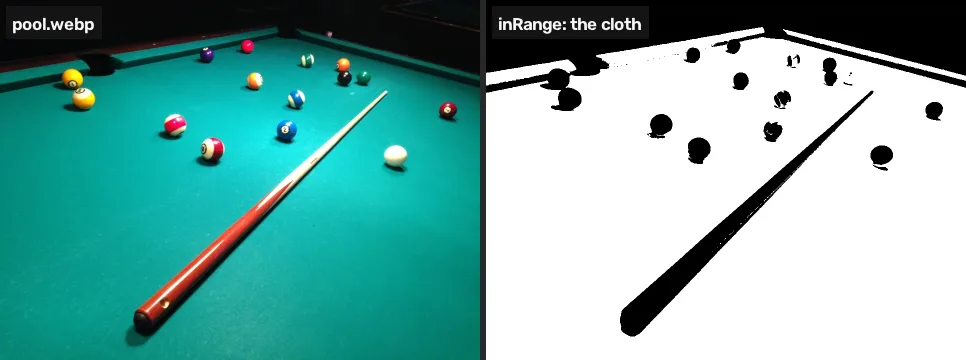
Turn an HSV range into a black-and-white mask with cv2.inRange, flip it with bitwise_not and apply it with bitwise_and. On the pool table one call marks 79.3% of the photo as cloth.
A mask is a black-and-white picture that marks which pixels pass a test, and cv2.inRange makes one from a colour range in a single call.
Where you have met it: the chroma key filter in OBS and video editors, which is a mask on green; Select › By Color in GIMP and Select › Color Range in Photoshop.
TL;DR. One call turns the colour range from the last lesson into a map of where that colour is, and flipping the map gives everything else. On the pool photo 79.3% of the pixels fall in the cloth’s range; the rest, the “not cloth”, holds every ball but also the rails, the room and the cue.
The problem
Lesson 1 found the cloth’s range in HSV. In the project the balls are what is not cloth, so the next step is to mark every pixel as cloth or not, and then keep the others.
One range, one mask
import cv2
import numpy as np

img = cv2.imread("pool.webp")
hsv = cv2.cvtColor(img, cv2.COLOR_BGR2HSV)

lower = np.array([75, 80, 40])
upper = np.array([100, 255, 255])
cloth = cv2.inRange(hsv, lower, upper)

print(cloth.shape, cloth.dtype, np.unique(cloth))
print("cloth:", round(100 * np.mean(cloth > 0), 1), "% of pixels")
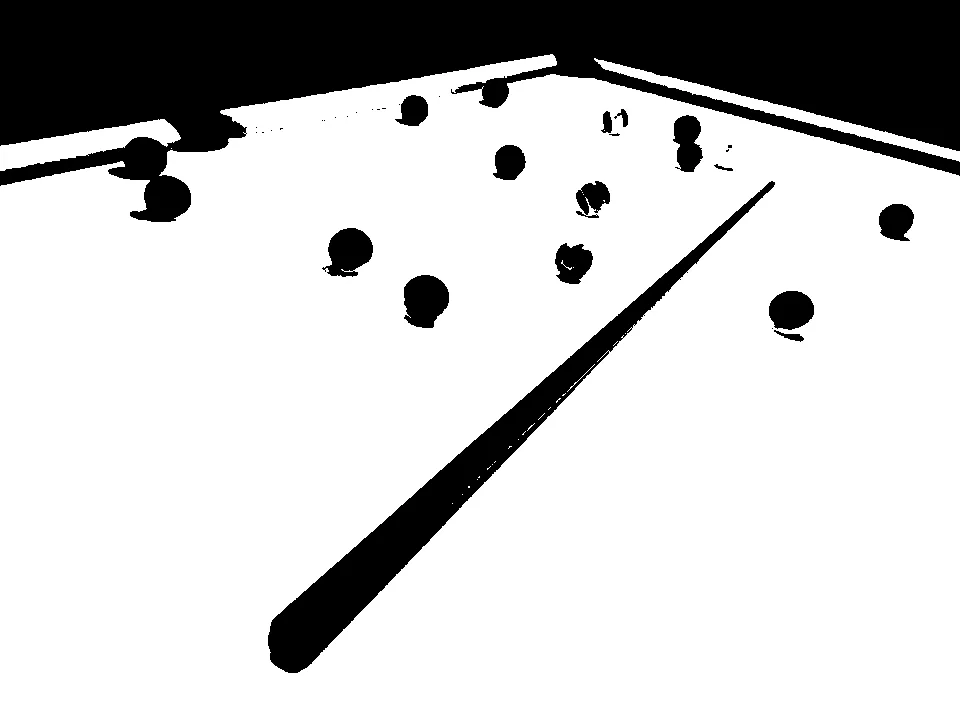
cv2.imshow("cloth", cloth)(720, 960) uint8 [ 0 255] cloth: 79.3 % of pixels
| Call | Arguments | What it does |
|---|---|---|
cv2.inRange(hsv, lower, upper) | an image, and the lowest and highest value allowed on each channel | 255 where every channel is inside its range, 0 elsewhere |
np.unique(cloth) | an array | the distinct values in it: here only 0 and 255 |
The result has one channel, not three, and only two values. A pixel is white only if all three tests pass: hue between 75 and 100, and saturation between 80 and 255, and value between 40 and 255 [1].
Flip it, then apply it
The balls are the holes in the cloth. bitwise_not swaps black and white, and bitwise_and with mask= keeps the photo’s pixels only where a mask is white:
not_cloth = cv2.bitwise_not(cloth)
# keep the photo's colours where the mask is white
cut = cv2.bitwise_and(img, img, mask=not_cloth)
cv2.imshow("not cloth", cut)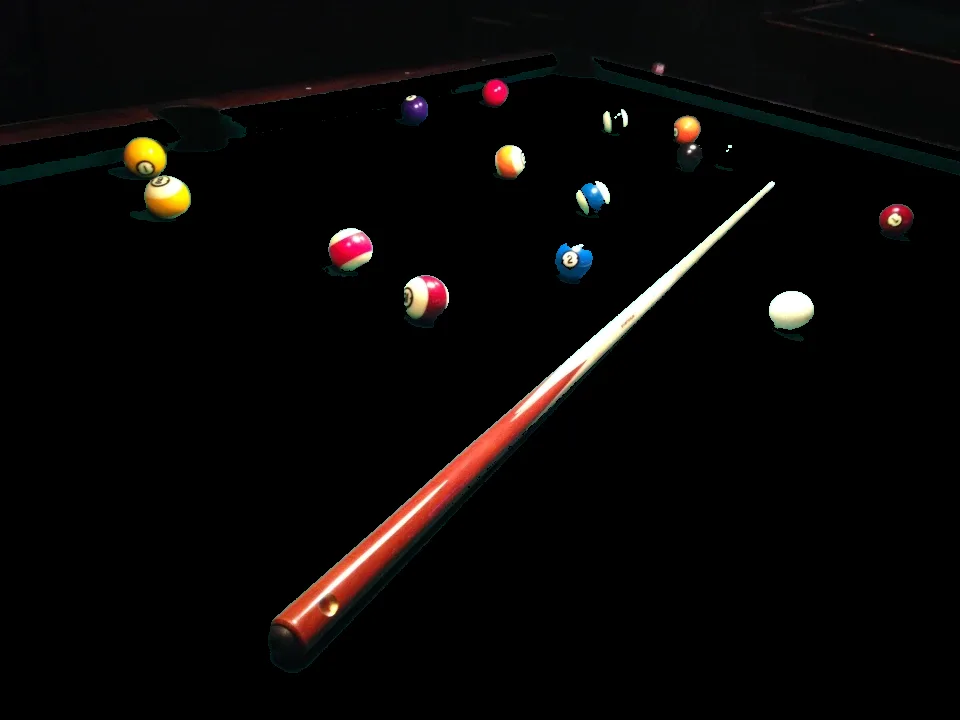
| Call | What it does |
|---|---|
cv2.bitwise_not(mask) | 255 becomes 0 and 0 becomes 255 |
cv2.bitwise_and(img, img, mask=m) | img where m is white, black elsewhere |
Every ball is in there. So is everything that is not the table: the rails, the pockets, the dark room and the cue. The mask answers “is this pixel cloth?”, and the room is not cloth. Lesson 4 uses the cloth mask a second time to find the table’s outline, so the room can be dropped. Before that, lesson 3 cleans up the specks.
Move the range yourself
The same six numbers, on sliders, applied to the same photo at a smaller size. Raise H min from 75 towards 85 and the mask starts to break up along the near edge, where the cloth’s hue is lowest; lower V min to 0 and patches of the dark room join the cloth, the failure lesson 5 measures.
Break it
bitwise_and wants two images of the same shape. The photo has three channels and the mask one, so passing the mask as the second image, instead of as mask=, fails:
# the mask passed as the second image, not as mask=
cut = cv2.bitwise_and(img, not_cloth)Traceback (most recent call last): File "<exec>", line 2, in <module> cv2.error: OpenCV(4.11.0) /home/runner/work/pyodide-recipes/pyodide-recipes/packages/opencv-python/build/opencv-python-4.11.0.86/opencv/modules/core/src/arithm.cpp:214: error: (-209:Sizes of input arguments do not match) The operation is neither 'array op array' (where arrays have the same size and type), nor 'array op scalar', nor 'scalar op array' in function 'binary_op'
OpenCV reports that the sizes of the inputs do not match. Masks go in the mask= argument.
Your turn
White has any hue, very little saturation and a high value. Make a mask called white that picks out the cue ball at x = 791, y = 311 and leaves the cloth black.
white = cv2.inRange(hsv, (0, 0, 0), (179, 255, 255))  # narrow this
cv2.imshow("white", white)
Why this works
A mask is a binary image: every pixel is one of two values, and the two stand for “yes” and “no”. inRange asks the same yes-or-no question of every pixel, whether its three numbers fall inside a box in HSV space [1] [2]. Gonzalez and Woods treat segmentation by colour in HSI, a space close to HSV that also separates hue from brightness, in their chapter on colour [3]. The payoff section of Colour spaces: choosing axes you can threshold does the same with red, whose hue wraps around 0.
Common mistakes
- Lower and upper swapped.
inRangedoes not sort them. A lower bound above the upper bound matches nothing, with no error. - Red in one range. Red sits near both 0 and 179. Make two masks and join them with
cv2.bitwise_or. - The mask as an image argument. Pass it as
mask=, as the Break it cell shows. It must be a single-channeluint8array the same height and width as the image. - Expecting “not cloth” to mean “balls”. Inverting a mask selects everything else, and in a photo that includes the background.
References
[1] OpenCV. Thresholding Operations using inRange (tutorial, doc/tutorials/imgproc/threshold_inRange/threshold_inRange.markdown). OpenCV 4.11.0, commit 31b0eee. github.com/opencv/opencv
[2] OpenCV. Changing Colorspaces (Python tutorial, doc/py_tutorials/py_imgproc/py_colorspaces/py_colorspaces.markdown). OpenCV 4.11.0, commit 31b0eee. github.com/opencv/opencv
[3] Gonzalez, R. C., & Woods, R. E. (2018). Digital Image Processing (4th ed.), section 7.7 “Using Color in Image Segmentation”, Segmentation in HSI Color Space, p. 576. Pearson.
[4] MarkBuckawicki. Billiards table 2.JPG (27 Feb 2014). Wikimedia Commons, CC0 1.0. commons.wikimedia.org
