Why it works: Unit 1.3: The image as data
Where Color Detection Fails in OpenCV
Score a colour-mask pipeline against a hand count on three pool table photos, fix the pockets and the shadows, and see what colour cannot fix: 27 of 41 balls found at first, 29 after the fixes, 9 of the 12 misses touching another ball.
Finding things by colour works until something is the wrong colour for the rule, and the way to find out where is to count, ball by ball, against a count done by hand.
Where you have met it: every “it worked on my photo” demo; the chroma key that eats a green shirt; a sorting line that rejects good fruit in the shade.
TL;DR. The first pipeline mistakes dark pockets for balls and loses balls that sit on darker cloth, and one line fixes each; what it cannot fix is balls that touch, and a ball the colour of the cloth. On three photos with 41 balls it finds 27 at first with 3 false alarms, and 29 with 2 after the fixes; 9 of the 12 balls still missed are touching another ball.
The problem
Lesson 4 ended with eleven round blobs on one photo, judged by eye. Judging by eye flatters a method. This module has three photos of the same table from different angles, and the centre of every ball on the cloth was placed by hand on zoomed crops: 41 balls in all. A ball counts as found when a kept blob’s centre lands inside its outline, and each ball and each blob can be matched only once.
The pipeline as two functions
Everything from lessons 1 to 4, with two settings left open: the brightness floor of the cloth range, v_min, and a test this lesson adds, pocket_v.
import cv2
import numpy as np

def objects_on_table(hsv, v_min):
    cloth = cv2.inRange(hsv, (75, 80, v_min), (100, 255, 255))
    cs, _ = cv2.findContours(cloth, cv2.RETR_EXTERNAL,
                             cv2.CHAIN_APPROX_SIMPLE)
    hull = cv2.convexHull(max(cs, key=cv2.contourArea))
    table = cv2.fillPoly(np.zeros_like(cloth), [hull], 255)
    table = cv2.erode(table, np.ones((19, 19), np.uint8))
    obj = cv2.bitwise_and(cv2.bitwise_not(cloth), table)
    k5, k7 = np.ones((5, 5), np.uint8), np.ones((7, 7), np.uint8)
    obj = cv2.morphologyEx(obj, cv2.MORPH_OPEN, k5)
return cv2.morphologyEx(obj, cv2.MORPH_CLOSE, k7)def find_balls(img, v_min=40, pocket_v=0):
hsv = cv2.cvtColor(img, cv2.COLOR_BGR2HSV)
obj = objects_on_table(hsv, v_min)
cs, _ = cv2.findContours(obj, cv2.RETR_EXTERNAL,
cv2.CHAIN_APPROX_SIMPLE)
balls = []
for c in cs:
a, p = cv2.contourArea(c), cv2.arcLength(c, True)
blob = cv2.drawContours(np.zeros_like(obj), [c], -1, 255, -1)
brightest = hsv[..., 2][blob > 0].max()
round_ = a >= 45 and 4 * np.pi * a / p**2 > 0.55
if round_ and brightest >= pocket_v:
balls.append(cv2.minEnclosingCircle(c)[0])
return ballsScore it against the hand count
import json
labels = json.load(open("labels.json"))

def score(balls, truth):
    # closest pairs first; a hit lands inside the ball
    pairs = sorted((np.hypot(bx - x, by - y), i, j)
                   for i, (x, y, r) in enumerate(truth)
                   for j, (bx, by) in enumerate(balls))
    hit_t, hit_b = set(), set()
    for d, i, j in pairs:
        if i not in hit_t and j not in hit_b and d < max(truth[i][2], 8):
            hit_t.add(i)
            hit_b.add(j)
return len(hit_t), len(balls) - len(hit_b)photos = ["pool", "pool-close", "pool-wide"]
imgs = {n: cv2.imread(f"{n}.webp") for n in photos}
def report(**settings):
total = np.zeros(2, int)
for n in photos:
found, false = score(find_balls(imgs[n], **settings), labels[n])
total += (found, false)
print(f"{n:11} {found:2} of {len(labels[n])}, {false} false")
print(f"{'total':11} {total[0]} of 41, {total[1]} false")
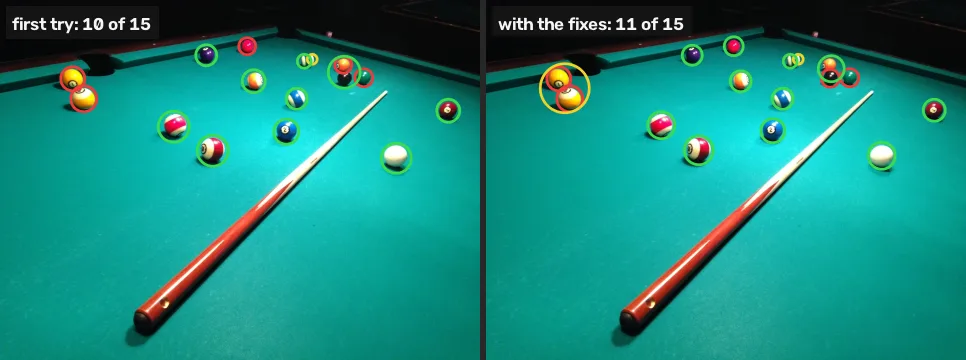
report()pool 10 of 15, 1 false pool-close 8 of 12, 1 false pool-wide 9 of 14, 1 false total 27 of 41, 3 false
27 of 41, with 3 false alarms, one per photo. The debug pictures show three kinds of miss and two kinds of false alarm, and two of them have a one-line fix.
Fix 1: a pocket is a hole
In pool-close and pool-wide a pocket survives every test: it is not cloth, it sits inside the table’s outline, and it is round. What it does not have is light. Every ball is glossy and carries a highlight; a pocket has none. Across the three photos, the brightest pixel of every blob this test throws out is at most 45 on the 0–255 value scale, and the dimmest highlight on a real ball is 144, so a threshold of 60 has room on both sides:
report(pocket_v=60)pool 10 of 15, 1 false pool-close 8 of 12, 0 false pool-wide 8 of 14, 0 false total 26 of 41, 1 false
The false alarms drop from 3 to 1. The found count drops too, from 27 to 26, and that is a correction, not a loss: in pool-wide the green ball is invisible against the cloth, and what had been counted as it was its shadow, a dark blob landing just inside its outline. The pocket rule removes it for the same reason it removes pockets.
Fix 2: dark cloth is still cloth
Lesson 1 read the cloth at the far end of the table at value 37 and a shadow on it at 21, both below the range’s floor of 40. So the mask calls a dark strip of cloth “not cloth”, and a ball sitting on that strip joins it in one ragged blob that fails the roundness test. Lower the floor:
report(v_min=10, pocket_v=60)pool 11 of 15, 2 false pool-close 9 of 12, 0 false pool-wide 9 of 14, 0 false total 29 of 41, 2 false
29 of 41, 2 false. The change moves errors around more than it removes them: five balls come back, four of them at the dark far end or along the dark rail, and two are lost. The blue ball close to the camera in pool-close is lost because its shadow, now partly cloth, leaves a ragged dark core attached to it; the black ball in pool.webp trades places with the orange ball it touches, since only one of a touching pair can be matched. The two yellow balls at the rail in pool.webp, freed of the dark cloth around them, now pass as one round blob whose centre lands between them: one false alarm and two misses.
The floor goes to 10 and not to 0 for a reason the Break it cell shows. The exact value matters little and noisily: any floor from 0 to 20 finds 28 or 29, which the project page lists in full.
What colour cannot fix
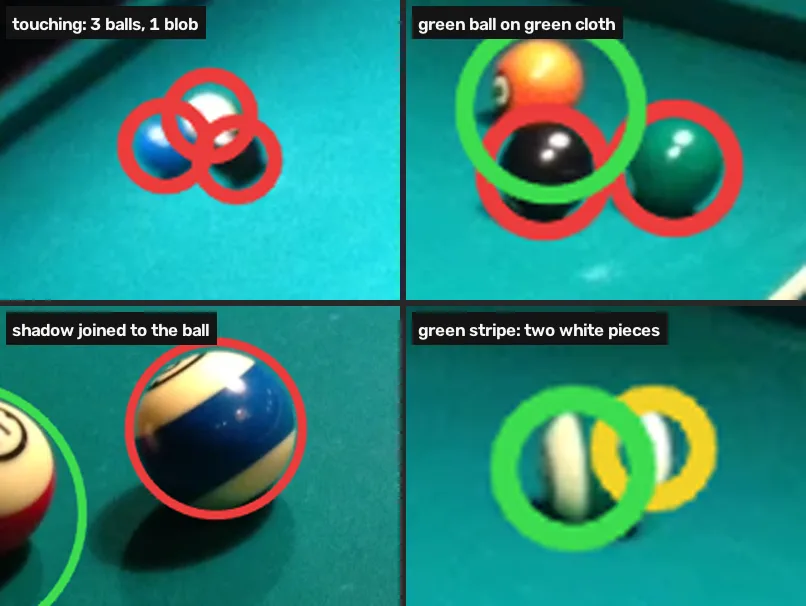
Of the 12 balls still missed, 9 touch another ball, 2 are green balls on green cloth, and 1 is the blue ball close to the camera, whose shadow is dark enough to fall below even the lowered floor. No colour range separates two red balls that touch, and no colour range separates a green ball from green cloth without also cutting into the cloth. These need a different kind of tool: shape (the distance transform, or circle detection) for touching objects [3], which the next module uses on coins, or a trained detector.
Break it
Drop the floor all the way to 0 and take away the pocket rule:
report(v_min=0)pool 11 of 15, 2 false pool-close 8 of 12, 15 false pool-wide 9 of 14, 1 false total 28 of 41, 18 false
pool-close jumps to 15 false alarms. At value 0 the cloth range accepts any near-black pixel whose hue happens to land between 75 and 100, and in a black room after compression, many do. The table’s outline, the convex hull of the largest “cloth” region, grows out into the room, and everything in it becomes an object.
Your turn
The project page reports the total at several floors. Run the pipeline with v_min=20 and pocket_v=60 on all three photos, and store the total number found in found20.
found20 = 0
# your loop here
print(found20)
Why this works
The pocket rule works because a pocket is a hole that returns almost no light while a ball is a glossy sphere, so somewhere on it the light source is reflected nearly white. The shadow fix works because HSV keeps brightness in its own number (lesson 1) [1], so a darker version of the cloth has the same hue and a lower value, and one bound decides whether it counts. Neither changes what the pipeline is: a test of each pixel’s colour, then of each blob’s shape. Objects that share a colour and touch need the shape of the blob itself to be split, the problem the watershed method solves for touching coins with a distance transform [3] [2]. Colour also has no answer for a green ball: for that, see how close is your colour on how little separates two nearby colours once a camera has recorded them.
Common mistakes
- Judging by eye on one photo. The first attempt looks fine on
pool.webp. Counting on three photos found 14 misses and 3 false alarms. - Counting blobs instead of matching them. A blob that sits between two balls is one false alarm and two misses, not “one ball found”. Match each blob to at most one ball.
- Lowering a threshold to 0. Hue means nothing on a black pixel. The Break it cell shows what 0 does.
- Tuning on the photos you report. Every setting here was chosen while looking at these three photos, so 29 of 41 is a best case. Try your own photo with “Use your image” in lesson 4.
References
[1] OpenCV. Changing Colorspaces (Python tutorial, doc/py_tutorials/py_imgproc/py_colorspaces/py_colorspaces.markdown). OpenCV 4.11.0, commit 31b0eee. github.com/opencv/opencv
[2] Gonzalez, R. C., & Woods, R. E. (2018). Digital Image Processing (4th ed.), section 10.7 “Segmentation Using Morphological Watersheds”, p. 849. Pearson.
[3] OpenCV. Image Segmentation with Watershed Algorithm (Python tutorial, doc/py_tutorials/py_imgproc/py_watershed/py_watershed.markdown). OpenCV 4.11.0, commit 31b0eee. github.com/opencv/opencv
[4] MarkBuckawicki. Billiards table 1.JPG, Billiards table 2.JPG and Billiards Table.JPG (27 Feb 2014). Wikimedia Commons, CC0 1.0. commons.wikimedia.org
