
Colour Spaces: Choosing Axes You Can Threshold
Lesson 4 of The Image as Data. A colour space is a choice of axes for the same three numbers, and the choice is what makes a question easy or impossible. Worked on one measured chart patch: RGB (149.8, 58.3, 34.0) becomes luma 82.8, hue 12 degrees stored as 6, and a Lab triple — plus the five-line red detector that is brittle in RGB and robust in HSV.
TL;DR — a colour space is a choice of axes for the same three numbers, and the choice is what makes a question easy or impossible. Worked on one measured chart patch: RGB (149.8, 58.3, 34.0) becomes luma 82.8, a hue of 12° that OpenCV stores as 6, and a Lab triple. Then the payoff — the five-line red detector that is brittle in RGB and robust in HSV.
Where we are
Part of The Image as Data. Lesson 3 treated the three numbers at a pixel as three scalars to be rounded. This lesson asks what coordinate systems they can be written in, and why you would move between them.
Where those three numbers came from is unit 1.2’s business: the sensor measured one of them and interpolated the other two. Here they simply exist, and every number below is sampled from the chart in the frame this unit measures.
Choosing axes
A colour space is a choice of axes for the same information. You convert between them
because some questions are far easier to ask in one coordinate system than another. In
OpenCV every conversion goes through one function, cvtColor [2].
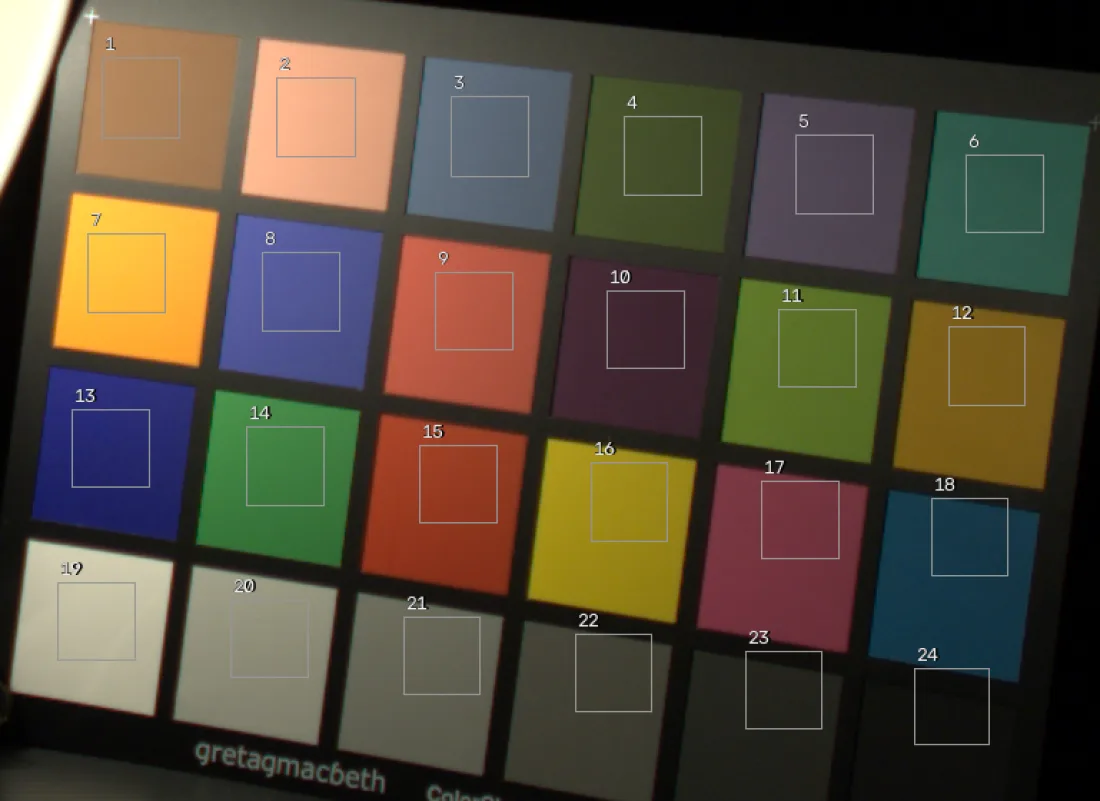
Every number below is patch 15 of the chart above — the red one — sampled from the frame at RGB (149.8, 58.3, 34.0). It is saturated enough that its hue is unambiguous and dark enough that nothing clips.
Grayscale (luma)
Dropping color collapses three channels to one. It isn’t a plain average. The weights match human luminance sensitivity (Rec. 601):
gray = cv2.cvtColor(img, cv2.COLOR_BGR2GRAY) # shape (H, W), single channelcv::Mat gray;
cv::cvtColor(img, gray, cv::COLOR_BGR2GRAY); // single-channel CV_8UC1// img: flat H*W*3 BGR bytes. gray: H*W bytes. Just the Rec. 601 formula,
// applied pixel by pixel, exactly what cvtColor does internally.
std::vector<unsigned char> gray(H * W);
for (int i = 0; i < H * W; ++i) {
float b = img[i*3 + 0], g = img[i*3 + 1], r = img[i*3 + 2];
gray[i] = static_cast<unsigned char>(0.299f*r + 0.587f*g + 0.114f*b + 0.5f);
}HSV: hue, saturation, value
RGB mixes color and brightness together, which makes “find the red things” hard when lighting changes. HSV separates what the color is (hue) from how vivid (saturation) and how bright (value). With , let , , and chroma :
A gotcha worth memorizing: in 8-bit OpenCV, hue is stored in (degrees halved to fit a byte), while and use the full .
hsv = cv2.cvtColor(img, cv2.COLOR_BGR2HSV) # H in [0,179], S,V in [0,255]cv::Mat hsv;
cv::cvtColor(img, hsv, cv::COLOR_BGR2HSV); // H in [0,179], S,V in [0,255]// img: flat H*W*3 BGR bytes -> hsv: flat H*W*3 bytes (H in [0,179]).
// Needs <algorithm> and <cmath>. This is the §4 formula, byte by byte.
std::vector<unsigned char> hsv(H * W * 3);
for (int i = 0; i < H * W; ++i) {
float b = img[i*3+0]/255.f, g = img[i*3+1]/255.f, r = img[i*3+2]/255.f;
float mx = std::max({r, g, b}), mn = std::min({r, g, b});
float c = mx - mn; // chroma
float h = 0.f;
if (c > 0.f) {
if (mx == r) h = std::fmod((g - b) / c, 6.f);
else if (mx == g) h = (b - r) / c + 2.f;
else h = (r - g) / c + 4.f;
h *= 60.f;
if (h < 0.f) h += 360.f;
}
float s = (mx == 0.f) ? 0.f : c / mx;
hsv[i*3+0] = static_cast<unsigned char>(h * 0.5f + 0.5f); // degrees/2 -> [0,179]
hsv[i*3+1] = static_cast<unsigned char>(s * 255.f + 0.5f);
hsv[i*3+2] = static_cast<unsigned char>(mx * 255.f + 0.5f);
}Now you try
Drag R, G, B and watch the same colour re-expressed as grayscale luma and HSV, with the OpenCV 8-bit hue ticking along at half the degrees. It starts on patch 15 — confirm and stored as 6, then walk R up towards 255 and watch the hue barely move while saturation climbs.
YCrCb: luma plus chroma
This is the space behind JPEG and most video. It keeps the luma and stores two color-difference channels (Rec. 601, 8-bit, with offset ):
Because the eye is far more sensitive to luma than chroma, codecs subsample (4:2:0) and almost nobody notices, a direct and daily payoff of the camera→color-space chain.
ycrcb = cv2.cvtColor(img, cv2.COLOR_BGR2YCrCb) # channels: Y, Cr, Cbcv::Mat ycrcb;
cv::cvtColor(img, ycrcb, cv::COLOR_BGR2YCrCb); // channels: Y, Cr, Cb// img: flat H*W*3 BGR bytes -> ycrcb: flat H*W*3 bytes (Y, Cr, Cb).
// The linear Rec. 601 transform with offset delta = 128.
std::vector<unsigned char> ycrcb(H * W * 3);
const float delta = 128.f;
for (int i = 0; i < H * W; ++i) {
float b = img[i*3+0], g = img[i*3+1], r = img[i*3+2];
float y = 0.299f*r + 0.587f*g + 0.114f*b;
float cr = (r - y) * 0.713f + delta;
float cb = (b - y) * 0.564f + delta;
ycrcb[i*3+0] = static_cast<unsigned char>(y + 0.5f);
ycrcb[i*3+1] = static_cast<unsigned char>(cr + 0.5f);
ycrcb[i*3+2] = static_cast<unsigned char>(cb + 0.5f);
}CIELAB: perceptually uniform
Lab is designed so that equal numerical distances look like roughly equal color
differences to a human, which is handy for color comparison and matching [4]. It’s a
nonlinear transform through CIE XYZ, with the reference white:
lab = cv2.cvtColor(img, cv2.COLOR_BGR2Lab) # L in [0,255], a,b offset by 128cv::Mat lab;
cv::cvtColor(img, lab, cv::COLOR_BGR2Lab); // L in [0,255], a,b offset by 128Splitting and merging channels
Whatever space you’re in, you can pull it apart and put it back:
b, g, r = cv2.split(img)        # three single-channel images
merged = cv2.merge([b, g, r]) # back to one 3-channel imagestd::vector<cv::Mat> ch;
cv::split(img, ch); // ch[0]=B, ch[1]=G, ch[2]=R
cv::Mat merged;
cv::merge(ch, merged);// Split an interleaved BGR buffer into three planar channels, then merge back.
int n = H * W;
std::vector<unsigned char> B(n), G(n), R(n);
for (int i = 0; i < n; ++i) { // de-interleave
B[i] = img[i*3 + 0];
G[i] = img[i*3 + 1];
R[i] = img[i*3 + 2];
}
std::vector<unsigned char> merged(n * 3);
for (int i = 0; i < n; ++i) { // re-interleave
merged[i*3 + 0] = B[i];
merged[i*3 + 1] = G[i];
merged[i*3 + 2] = R[i];
}The payoff: segmenting by colour in HSV
Here’s why all of this matters. Picking out red objects in RGB is fiddly; in HSV it’s a hue window. Red is the awkward case because its hue wraps around 0, so we union two ranges:
import cv2
import numpy as np

hsv = cv2.cvtColor(img, cv2.COLOR_BGR2HSV)

# Red wraps around hue = 0, so combine the low and high ends.
mask1 = cv2.inRange(hsv, np.array([0, 120, 70]),   np.array([10, 255, 255]))
mask2 = cv2.inRange(hsv, np.array([170, 120, 70]), np.array([179, 255, 255]))
mask  = mask1 | mask2

result = cv2.bitwise_and(img, img, mask=mask) # keep only the red pixelscv::Mat hsv, mask1, mask2, mask, result;
cv::cvtColor(img, hsv, cv::COLOR_BGR2HSV);
// Red wraps around hue = 0, so combine the low and high ends.
cv::inRange(hsv, cv::Scalar(0, 120, 70), cv::Scalar(10, 255, 255), mask1);
cv::inRange(hsv, cv::Scalar(170, 120, 70), cv::Scalar(179, 255, 255), mask2);
cv::bitwise_or(mask1, mask2, mask);
cv::bitwise_and(img, img, result, mask); // keep only the red pixels// hsv: flat H*W*3 bytes (from the conversion above). inRange + bitwise_and
// are just a per-pixel test and a copy, with no library needed.
int n = H * W;
auto in = [](unsigned char x, int lo, int hi) { return x >= lo && x <= hi; };
std::vector<unsigned char> mask(n);
for (int i = 0; i < n; ++i) {
unsigned char h = hsv[i*3+0], s = hsv[i*3+1], v = hsv[i*3+2];
bool red = (in(h, 0, 10) && in(s, 120, 255) && in(v, 70, 255)) // low end
|| (in(h, 170, 179) && in(s, 120, 255) && in(v, 70, 255)); // hue wraps
mask[i] = red ? 255 : 0;
}
std::vector<unsigned char> result(n * 3, 0); // keep only the red pixels
for (int i = 0; i < n; ++i)
if (mask[i])
for (int c = 0; c < 3; ++c) result[i*3+c] = img[i*3+c];The same five lines that would be brittle in RGB are robust in HSV, purely because we chose better axes for the question.
Now you try
The six sliders are the six numbers in the snippet above, on OpenCV’s own 8-bit
scale, so a value you settle on here can be pasted straight into cv2.inRange.
Start on red and widen H max past 10. The window stops wrapping around zero,
the second mask disappears, and half the red goes with it. Then take S min to 0
and watch the grey disc arrive: with no saturation floor, “any hue” includes
colours that have no hue at all.
The dark red patch under the yellow disc is there for V min. It has hue 1.2 and
saturation 205; the bright disc has hue 1.3 and saturation 205. Nothing but value
tells them apart, so raise V min past 92 and the patch drops out while the disc
stays.
Then load a photo of your own.
In the wild
A hue window on a real subject, and the reason it is never as clean as the demo.
A fruit stall in a Marrakech souk: oranges, lemons, green melons, red pomegranates. “Select the oranges” is exactly the job HSV is for — and the histogram says why it will not go perfectly. Of the frame’s 12.0 million saturated pixels, the six most common hues are 32°, 34°, 36°, 38°, 40° and 42° — a ten-degree crowd. The oranges are in there, and so is everything else warm on the table.
| hue window | pixels selected | of the frame |
|---|---|---|
| 20–40° | 5.8 M | 25.4% |
| 16–50° | 8.1 M | 35.5% |
| 10–60° | 9.6 M | 41.8% |
| 0–80° | 11.3 M | 49.3% |
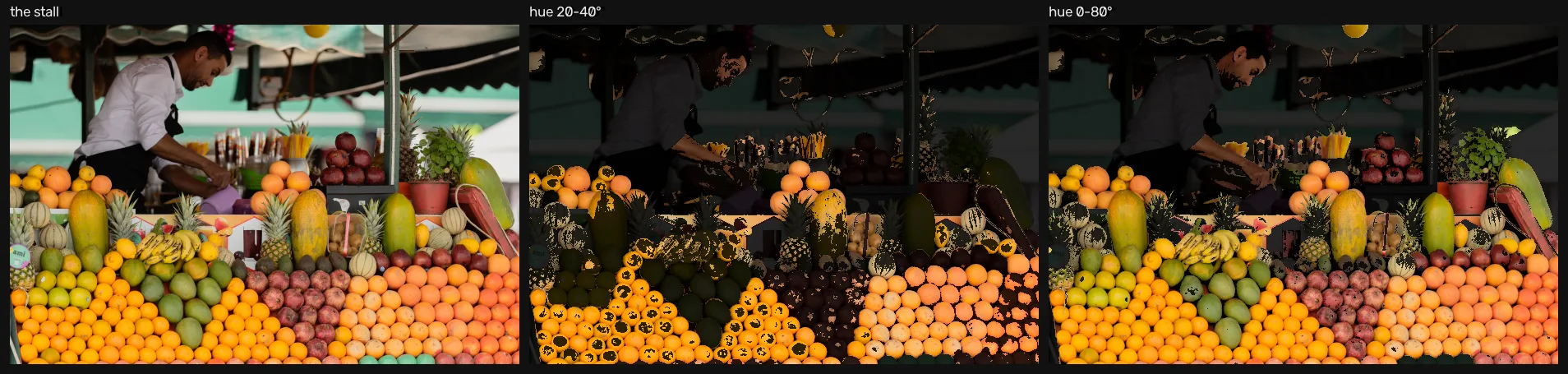
What it means: HSV did its job. It separated what colour from how bright, which is why the shaded oranges at the back are selected at all — in RGB they are a different set of numbers entirely. What it cannot do is separate two objects that genuinely share a hue, and no threshold on this axis ever will. That is the honest ceiling of colour thresholding, and it is why the next step in any real pipeline is shape, texture or a model.
Limitations & caveats
- Two thirds of every colour pixel is interpolated, so a colour read off a sharp edge is partly invented — measured in unit 1.2 at twenty-eight times the flat-patch error. Everything here samples flat patch interiors, which is the friendliest case available.
- 8-bit ranges and conventions bite. OpenCV is BGR, indexed
(row, col), with hue in , and mixing these up is the most common colour-space bug [2]. - Lab’s perceptual guarantee assumes a colour space and a white.
cvtColor’s RGB↔Lab and RGB↔YCrCb maths assumes sRGB primaries and a D65 reference white, and this scene is tungsten-lit. How much that costs is the next lesson, which measures it against a colorimeter [3]. - HSV separates hue from brightness; it does not separate hue from the illuminant. The same chart in this scene’s shadow has the same hue and a very different value, and a hue window tuned on the lit chart will not transfer to it.
Takeaways
- A colour space is a choice of axes, and
cvtColoris the one function that moves between them: grayscale to drop colour, HSV to threshold it, YCrCb for compression, Lab for perceptual distance. - Watch the ranges: 8-bit hue lives in , not .
- Choosing axes is free; knowing what they mean physically is not — which is what the next lesson measures.
Next
How close is your colour to the real thing? — every conversion above is exact arithmetic, which says nothing about whether the numbers describe the light that was in the room. Checking that against a colorimeter is the next lesson.
Further reading
- Go deeper: Gonzalez & Woods, Digital Image Processing (4th ed.), ch. 7 (Color Image Processing, p. 529), §7.2 (Color Models, p. 535) [1] — it develops HSI rather than HSV, the same hue-and-saturation idea on a different third axis.
- Colour science in depth: Reinhard et al., Color Imaging [4], for when a ΔE of 9.54 is not acceptable and you need to know what to do about it.
- Related on CondadosAI: the camera response curve — why the neutral row’s error grows into the shadows · next in the unit, file formats and compression.
References
[1] Gonzalez, R. C., & Woods, R. E. (2018). Digital Image Processing (4th ed.), ch. 7 (Color Image Processing, p. 529), §7.2 (Color Models, p. 535). Pearson. Detailed table of contents.
[2] OpenCV. Color conversions (cvtColor), OpenCV 5.0.0 documentation — including the 8-bit hue range and the BGR channel order. Docs.
[3] Fairchild, M. D. (2007). The HDR Photographic Survey. Proceedings of the IS&T 15th Color and Imaging Conference, pp. 233–238. doi:10.2352/CIC.2007.15.1.art00044 — the scene this unit measures. Used for research and non-commercial publication, as its terms require; images are downloaded, never redistributed.
[4] Reinhard, E., Khan, E. A., Akyüz, A. O., & Johnson, G. M. (2008). Color Imaging: Fundamentals and Applications. A K Peters/CRC Press.