
3D Vehicle Detection on a Laptop iGPU
UrbanOmniDetect-2 draws a 3D box around every vehicle from one uncalibrated camera and places it on a top-down map of the road. On the Intel Iris Xe inside a 12th-gen laptop, quantized to INT8 with OpenVINO and with its final layer kept in float, the medium model runs at 33 ms per frame (30 fps), and its box corners stay within 0.4 px of the original model on two traffic cameras.
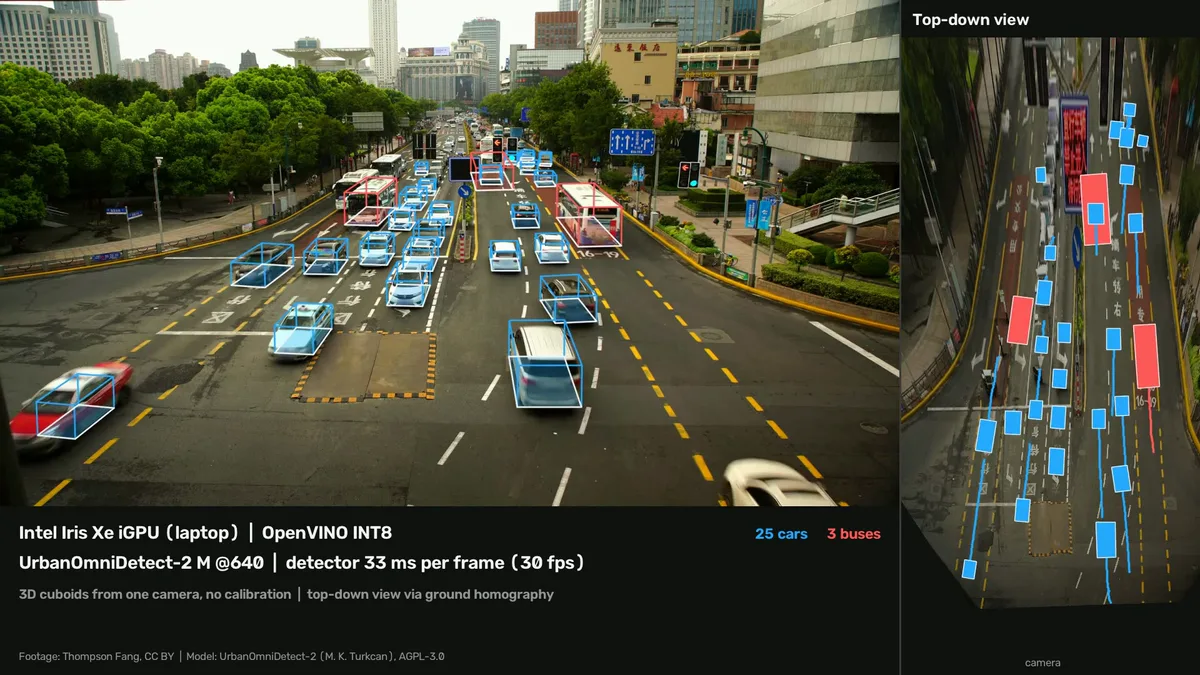
A traffic camera sees cars as flat pictures; this model turns each one into a box with a length, a width and a height, and puts it on a map of the road seen from above, without anyone measuring the camera first.

You have met this kind of output already, usually without the 3D part being visible:
- Traffic counting and classification on city cameras, where a car, a van and a bus need telling apart by size, not only by label.
- Parking and kerbside monitoring, which needs to know where a vehicle stands on the ground, not where it appears in the picture.
- Road-safety studies that measure gaps and closing speeds between vehicles, which only make sense on a top-down map.
- Driver-assistance research, where the same 3D boxes come from a camera on the car itself; the KITTI benchmark [13] that this model trains on is that viewpoint.
The surprise is how little hardware it needs: a recent model that reads 3D shape from one uncalibrated camera runs in real time on the graphics chip built into an ordinary laptop. UrbanOmniDetect-2 M at 640 px, quantized to INT8 with OpenVINO (Intel’s inference toolkit) and with its final layer kept in float, takes a median 33 ms per frame on an Intel Iris Xe (30 fps), 1.74× faster than FP16 on the same chip. Its box corners land within 0.39 px (median) of the original PyTorch model on one camera and 0.50 px on a second it was not calibrated on, and 98.5 to 98.9% of its detections match. These are agreement numbers, not accuracy: neither clip has ground truth.
The model is UrbanOmniDetect-2 by Mehmet Kerem Turkcan [1][2], the follow-up to a CVPR 2026 workshop paper. Its release was timed on an RTX PRO 6000. This post asks the edge question instead: what does it cost on hardware that is already on a desk, the Intel Iris Xe iGPU (an iGPU is the graphics chip inside the processor package, with no memory of its own) in a 12th-generation Core i7 laptop. The same laptop’s RTX 3060 and its CPU serve as the comparisons. It is the same question this site asked of YOLO-NAS and of YOLO26-seg and RF-DETR-Seg, now for a model whose output is geometry.
The two cameras
Both clips are real footage under a Creative Commons Attribution (CC BY) licence, filmed from a footbridge by a fixed camera, and the model’s released training mix lists no YouTube footage [2]:
| Footbridge road | Shanghai crossing | |
|---|---|---|
| Scene | 2+2-lane road with a slip road, suburban | ten-lane signalised crossing, bus lane, buses and taxis |
| Source | Karol Majek [14], 4K, 30 fps | Thompson Fang [15], 4K, 25 fps |
| Used for | every latency number; INT8 calibration (a separate stretch) | a second parity check the calibration never saw (at 238 s; the demo shows 50 to 64 s) |
| Vehicles with a 3D box per frame | 17.7 on average in the demo, 23 at most | 29.6 on average in the demo, 34 at most |
Every number in this post comes from these two clips. They are the running example: when a section says “the footbridge” or “Shanghai”, it means these frames.
What you are about to see
The video below runs the medium model (M, 21.3 M parameters [2]) quantized to INT8 on the Iris Xe. Watch the left panel for the boxes and the right panel for the top-down map, where each coloured rectangle is a vehicle’s footprint on the road and the line behind it is where it has been.
—refine pass; only the detector
is timed. The top-down background is an empty-road image built from the same camera.- Camera frame. A fixed camera nobody has measured: no focal length, no height, no tilt.
- Detector. One forward pass of a YOLO26 network with a pose head (the part of the network that outputs keypoints) [2]. This is the only step timed in this post, at 33 ms per frame on the Iris Xe in INT8.
- Box, class, 8 corners. For each road user the network returns a 2D box, one of the 80 everyday object classes of the COCO dataset, and eight keypoints: the corners of its 3D box as they appear in the image, four touching the road and four on the roof [1].
- Ground corners. The four road-contact corners of each vehicle are its footprint.
- Ground homography. A homography is a 3×3 matrix that maps one plane onto another (here, the road as photographed onto the road seen from above); the homography unit builds one from scratch. Turkcan’s solver starts from a normalised DLT fit (the standard estimate of a homography from point pairs, built step by step here) [4] and refines it over all the footprints under the constraint that each must come out as a rectangle with right-angled corners [1]. Knowing right angles on a plane is enough to recover its shape up to scale [3], which is what removes the need for camera calibration. For a fixed camera it is fitted once for the whole clip.
- Top-down map. Every footprint goes through that matrix onto the map. The background is the same camera’s view of the empty road, warped through the same matrix.
The warp in step 6 is the same operation as the bird’s-eye view of a pickleball court in unit 3.5. Drag the court’s corners and watch the top-down view follow; on the road, the four corners come from the vehicles instead of the painted lines.
Frame 45000 of "2026.07.25 WD Open … (Gold Medal match)" by pickleball4you, CC BY 3.0.
The speed: 30 fps on the laptop’s own graphics chip
Every row below is the detector’s inference stage alone, at 640 px, as the median of 200 frames of the footbridge clip after 20 warm-up frames, in three separate sessions (the spread between them is under the chart; how the sessions were run is in the reproducibility block). INT8 means the weights and activations are 8-bit integers instead of 16- or 32-bit floats [5], and FP16 or FP32 means 16- or 32-bit floats. “Float head” means everything is INT8 except the network’s final layer, the part that writes out the boxes and corners.
Read it from the decision you are making. On the iGPU, INT8 with a float head is what crosses the line into real time: 33.2 ms against 57.8 ms for FP16, a 1.74× speed-up (the frame time drops by 43%). The CPU on its own is not far behind in INT8, at 48.2 ms, 3.3× faster than the same CPU in FP32 [9]. The discrete RTX 3060 with TensorRT (NVIDIA’s inference compiler) [11] is in another league at 4.0 ms, which is the reason to buy one, and the reason this post is about the cases where you do not have one.
The model the release was shown with is the largest one, X, at 960 px. On the same Iris Xe it takes 303.9 ms per frame, 3.3 fps, and 20.9 ms on the RTX 3060 with TensorRT. The medium model at 640 px is the one that fits this hardware.
Move the frame rate and flip between a cool and a hot machine to see where each configuration stops keeping up:
The quality: what INT8 does to the corners
A faster model is only useful if it still puts the corners in the same place. Every quantized or exported model here is compared with the original PyTorch FP32 model on the same frames. A detection matches when there is an FP32 detection of the same class whose box overlaps it by at least half (IoU ≥ 0.5, with the IoU explained here), and corner error is the distance in pixels between matching corners, counted where the FP32 model is confident in that corner.
| M @640 on the Iris Xe | Corner error median / p90 | Detections matched (recall / precision) |
|---|---|---|
| Footbridge, FP16 | 0.22 / 0.56 px | 99.5% / 99.7% |
| Footbridge, INT8 full | 0.96 / 3.04 px | 98.2% / 97.9% |
| Footbridge, INT8 float head | 0.39 / 0.98 px | 98.9% / 98.7% |
| Shanghai, FP16 | 0.31 / 0.53 px | 99.6% / 99.5% |
| Shanghai, INT8 full | 0.95 / 2.64 px | 97.5% / 95.8% |
| Shanghai, INT8 float head | 0.50 / 1.21 px | 98.5% / 98.2% |
The p90 is the error that 90% of corners stay under. Recall here is the share of FP32 detections the quantized model also finds, and precision is the share of its detections that FP32 also made.
The pattern holds on the Shanghai clip, which the calibration never saw: 0.95 px full INT8
against 0.50 px with the float head. It also matches what happened to
RF-DETR-Seg’s mask head on this same iGPU, where full
INT8 broke the masks outright: the last layer, which writes the geometry, is the one that
pays for 8-bit arithmetic. OpenVINO’s quantization guide gives excluding the model’s last
layer to preserve accuracy as its example of what ignored_scope is for [7], and the
Ultralytics INT8 exporter does the same with the MIXED preset [12], where weights are
quantized symmetrically and activations asymmetrically [6][10]. Finding the layer by
quantizing one part at a time is the debugging procedure in Nagel et al. [6]. I tested one
calibration set (300 frames) and one preset; a different calibration mix or quantization-aware training could
close the gap without the float head, and I did not try either.
What this means if you are deploying it
- One camera at 15 fps runs on a laptop with no graphics card. The Iris Xe takes 33 ms per frame median, 47 ms on a hot day, with the M model in INT8 and its final layer in float. Two cameras fit when the machine runs cool.
- Keep the final layer in float when you quantize. It costs nothing measurable in speed and halves the corner drift (0.96 → 0.39 px on the footbridge, 0.95 → 0.50 px in Shanghai).
- Pick the M model at 640 px for this hardware. The release’s X at 960 px takes 304 ms per frame on the Iris Xe (3.3 fps). If the scene has large vehicles close to the camera, X is the one that gets their boxes right (see Limitations), and it needs a discrete GPU: 21 ms on an RTX 3060 with TensorRT.
- Plan for heat. The iGPU shares a power budget with the CPU, and the same configuration ranged from 26.1 to 47.1 ms across three sessions. Size the camera count on the slow end.
- Budget for the AGPL. The model’s weights are AGPL-3.0 by their model card, its code by its README (the repository has no LICENSE file), and the Ultralytics library that runs them is AGPL-3.0 too [2][12]. It is a licence whose obligations reach software offered to users over a network. Have that read before you build a product on it. TensorRT, for the discrete-GPU path, is under NVIDIA’s proprietary licence.
- This does not tell you the accuracy on your road. Every quality number here is agreement with the FP32 model, on two clips with no ground truth. For measured 3D accuracy see the release’s KITTI results [2], and expect your camera to differ.
Limitations & caveats
- No ground truth. The 98.5 to 98.9% match and the 0.39 to 0.50 px corner error compare the quantized model with the original one. They say the deployment did not change the model; they do not say the model is right. The release reports KITTI 3D accuracy for each size [2]; I did not re-measure it.
- Large vehicles cut by the frame edge break the M model’s boxes. On the footbridge a bus entering at the right edge got a box covering only its front, and in Shanghai a turning bus leaving at the left got one covering its rear. X at 960 px drew the footbridge bus correctly (all eight corners above 0.62 confidence in a single-frame check). The demo video stops the footbridge clip at 17 s, before the bus, starts the Shanghai clip 8 s into its segment, after one such bus, and draws vehicles touching the frame edge as flat 2D boxes. That editing is deliberate and it hides a real failure.
- The latency is the detector alone. Preprocessing adds about 1.8 ms and postprocessing 0.3 ms per frame (reported separately in the artifact). Tracking, the ground solve and the offline smoothing that make the video steady were not timed; the upstream renderer’s own counter reported 19.6 to 20.2 fps for detection, tracking and the ground solve together on this iGPU, once per render, while also writing video.
- The video’s smoothness is offline. It comes from the upstream
--refinepass, which uses the whole clip to make each track a rigid box. A live system without it shows more jitter. - The top-down map has no scale. Without calibration the ground plane is known up to an unknown scale, so positions are in “car lengths”, not metres. Far from the camera the footprints get unreliable: in the footbridge frame, cars whose image box was about 45 px tall came out at roughly half the median car length on the map.
- One laptop, one iGPU. Other Iris Xe parts have different execution-unit counts and power limits. In session 1, the INT8 speed-up over FP16 on the iGPU (1.3× to 1.9× across the N, S and M sizes) was smaller than INT8 over FP32 on the CPU (2.1× to 3.5×); I did not test why.
- Session-to-session drift is large on the iGPU. The featured row ranged from 26.1 to 47.1 ms. The discrete GPU and the CPU stayed within 10%.
- Near-miss detection is not in here. A first try at measuring time-to-collision between vehicles on the top-down map flagged ordinary braking into a queue as danger, because a constant-speed assumption cannot tell the two apart. A version with measures built for that, on the full five-minute clips, is the next post.
Reproducibility
| Parameter | Value |
|---|---|
| CPU | Intel Core i7-12700H (14 cores, 20 threads) |
| iGPU | Intel Iris Xe (in the i7-12700H), OpenVINO device GPU.0 |
| dGPU | NVIDIA GeForce RTX 3060 Laptop, 6 GB, driver 580.173.02 |
| RAM and OS | 31 GB; Ubuntu 22.04.5 LTS, kernel 6.8.0-138-generic; on AC power |
| Library versions | Python 3.12.9, torch 2.14.1+cu130, ultralytics 8.4.61, openvino 2026.4.1, nncf 3.4.0, tensorrt-cu13 10.16.1.11, opencv 5.0.0.93 |
| Model and checkpoint | UrbanOmniDetect-2 n/s/m/l/x 640 checkpoints, Hugging Face revision be4f69a, AGPL-3.0 per the model card; code at commit caa8537, AGPL-3.0 per its README [2]. Loaded through a two-line inference-only stub, so no upstream code runs during measurement |
| Export | stock Ultralytics export(format="openvino"/"engine", half=True, imgsz=640 or 960, batch=1, dynamic=False) [12] |
| Quantization | NNCF post-training, preset MIXED, 300 calibration frames from the footbridge video at 70 s to the end (disjoint from the timed segment), letterboxed like the predictor; “float head” = module 23 (the Pose26 head) in ignored_scope [10] |
| Precision labels | by execution, not by file: the iGPU plugin’s default inference precision is f16 and the CPU’s is f32 on this processor (no AVX512_BF16) [8][9], both read back from the runtime on this laptop. Hence “iGPU FP16” and “CPU FP32” for the same FP16 IR |
| Data | Footbridge: Karol Majek [14], scaled to 1080p; timing and parity on the first 220 frames (7.3 s) of the segment starting at 26 s. Shanghai: Thompson Fang [15], 1080p; parity on the first 220 frames (8.8 s) from 238 s. Demo: footbridge 26 to 43 s, Shanghai 50 to 64 s |
| Timing method | Ultralytics per-stage profile, inference stage only, median of 200 frames after 20 warm-up frames; square letterbox (rect=False) for every backend; TensorRT time includes the host-to-device copy, PyTorch CUDA is synchronised |
| Sessions | 3 sessions on 4 and 5 October 2026 for the featured rows; in the third, each run waited up to 3 minutes for the CPU to cool and logged the iGPU clock (1300 of 1400 MHz); most other rows 2 sessions |
| Excluded from timing | decode, preprocessing (median ~1.8 ms), postprocessing (~0.3 ms), tracking, ground solve, refinement, rendering |
| Parity | per frame, Hungarian matching on class and IoU ≥ 0.5 against PyTorch FP32 at confidence ≥ 0.25; corners counted where FP32 corner confidence ≥ 0.5 |
| Demo rendering | upstream bev_realtime_v2.py --refine --labels with the INT8 IR on the iGPU, composed by scripts/compose.py; plates blurred with open-image-models (MIT); empty-road backgrounds as the per-pixel median of 236 frames (footbridge) and of 360 frames with detected vehicles masked out (Shanghai, where a queue at the red light never clears) |
Command, for the featured row:
uv run python scripts/quant_ov.py --ir models/v2m_640_fp16_openvino_model \
  --clip data/clips/karol_calib_1080.mp4 --n 300 --imgsz 640 --ignore-head
uv run python scripts/bench.py --model models/v2m_640_int8head_openvino_model \
  --device intel:gpu.0 --imgsz 640 --clip data/clips/karol_seg_1080.mp4 \
  --frames 200 --warmup 20 --tag ov-igpu-int8head-m640 --session s3
Every number in this post is in output/results_all.md, output/latency*.jsonl or
output/parity_*.jsonl in the companion repo,
except three that come from the demo renders, which the repo’s scripts regenerate: the
cuboid counts per frame and the 45 px car height (label files), and the upstream renderer’s
19.6 to 20.2 fps (its console output).
Further reading
- The method: Turkcan, Gumaste and Kostic’s paper [1], for how eight corners and a right-angle constraint replace camera calibration, and the KITTI comparison against methods that need it.
- The geometry underneath: Hartley and Zisserman [3], ch. 1 (a free sample chapter), for why a plane maps to a plane through a 3×3 matrix, and the homography unit on this site for the same idea built step by step, including computing one from four points.
- Quantization in practice: Nagel et al. [6], §3 and its debugging flow chart, for the standard post-training pipeline and how to find the one layer that breaks under INT8.
- Related on CondadosAI: YOLO-NAS on a laptop CPU and iGPU · RF-DETR vs YOLO-NAS on the edge · player and ball tracking on an iGPU.
References
[1] Turkcan, M. K., Gumaste, D., & Kostic, Z. (2026). Calibration-Free View-Agnostic Monocular 3D Object Detection for Urban Scenes. Proceedings of the IEEE/CVF Conference on Computer Vision and Pattern Recognition (CVPR) Workshops, pp. 786–795, §3.1 “Overview”, §3.3 “Keypoint-Based 3D Box Prediction”, §3.4 “Bird’s-Eye-View Projection”. openaccess.thecvf.com. The paper’s model is the earlier YOLO11 pose-only version; this post cites it for the corner representation and the ground homography, which the release keeps.
[2] Turkcan, M. K. (2026). UrbanOmniDetect-2: One Network for Detection and Calibration-Free 3D Cuboids from Any Viewpoint. Software and model weights, AGPL-3.0 (declared in the README and the model card; the repository has no LICENSE file). github.com/mkturkcan/urbanomnidetect (commit caa8537, 29 Sep 2026); weights huggingface.co/mehmetkeremturkcan/UrbanOmniDetect-2 (revision be4f69a).
[3] Hartley, R., & Zisserman, A. (2004). Multiple View Geometry in Computer Vision (2nd ed.), ch. 1 “Introduction – a Tour of Multiple View Geometry”, §1.1.1 “Affine and Euclidean Geometry”, p. 4, and §1.2 “Camera projections”, p. 10. Cambridge University Press.
[4] Hartley, R., & Zisserman, A. (2004). Multiple View Geometry in Computer Vision (2nd ed.), ch. 4 “Estimation – 2D Projective Transformations”, §4.1 “The Direct Linear Transformation (DLT) algorithm”, p. 88, and §4.4 “Transformation invariance and normalization”, p. 104. Cambridge University Press.
[5] Jacob, B., Kligys, S., Chen, B., Zhu, M., Tang, M., Howard, A., Adam, H., & Kalenichenko, D. (2018). Quantization and Training of Neural Networks for Efficient Integer-Arithmetic-Only Inference. Proceedings of the IEEE/CVF Conference on Computer Vision and Pattern Recognition (CVPR), pp. 2704–2713, §2.1 “Quantization scheme”. doi:10.1109/CVPR.2018.00286 · arXiv:1712.05877
[6] Nagel, M., Fournarakis, M., Amjad, R. A., Bondarenko, Y., van Baalen, M., & Blankevoort, T. (2021). A White Paper on Neural Network Quantization. arXiv preprint, §2.4.1 “Symmetric vs. asymmetric quantization” (p. 8) and §3.7 “Debugging” (p. 17). arXiv:2106.08295
[7] OpenVINO Toolkit Documentation (2026.4). Basic Quantization Flow. docs.openvino.ai/2026
[8] OpenVINO Toolkit Documentation (2026.4). GPU Device, CPU Device and Precision Control. GPU · CPU · Precision Control
[9] OpenVINO (2026.4.1). GPU plugin default options (src/plugins/intel_gpu/include/intel_gpu/runtime/options.inl, inference_precision default f16) and CPU plugin configuration (src/plugins/intel_cpu/src/config.cpp, f32 unless the CPU has AVX512_BF16), tag 2026.4.1, commit e213a14. github.com/openvinotoolkit/openvino
[10] NNCF (3.4.0). nncf.quantize, QuantizationPreset (MIXED: symmetric weights, asymmetric activations) and IgnoredScope, tag v3.4.0, commit 1761616. github.com/openvinotoolkit/nncf
[11] NVIDIA TensorRT (10.16). NvInfer.h, BuilderFlag::kFP16 (“Enable FP16 layer selection, with FP32 fallback”), tag v10.16. github.com/NVIDIA/TensorRT. The 10.16 developer guide is no longer hosted; the header is the version-pinned source.
[12] Ultralytics (8.4.61). Model Export with Ultralytics YOLO and Pose Estimation, documentation and exporter source at tag v8.4.61 (the OpenVINO INT8 exporter calls nncf.quantize with QuantizationPreset.MIXED and an ignored_scope). AGPL-3.0. docs.ultralytics.com/modes/export · docs.ultralytics.com/tasks/pose
[13] Geiger, A., Lenz, P., Stiller, C., & Urtasun, R. (2013). Vision meets Robotics: The KITTI Dataset. The International Journal of Robotics Research, 32(11), 1231–1237. doi:10.1177/0278364913491297
[14] Majek, K. (2018). 4K Road traffic video for object detection and tracking - free download now! YouTube, Creative Commons Attribution licence. youtube.com/watch?v=MNn9qKG2UFI
[15] Fang, T. (2017). In Recording of Yanan Road East-Tibet Road Middle Crossing (title abridged; the full title opens with a Chinese description). YouTube, Creative Commons Attribution licence. youtube.com/watch?v=O0LyetdH4Lg