
Why it works: Unit 1.2: Image sensing, Unit 1.3: The image as data
Histogram Equalization and CLAHE in OpenCV
Try OpenCV's automatic contrast fixes, cv2.equalizeHist and CLAHE, on a dark photo with a bright lamp in it, and measure why they land further from the target exposure (30.6 and 35.5) than a plain multiplier (9.1).
Histogram equalization is the automatic contrast button: it spreads a photo’s brightness evenly across the whole range without being told how dark the photo was.
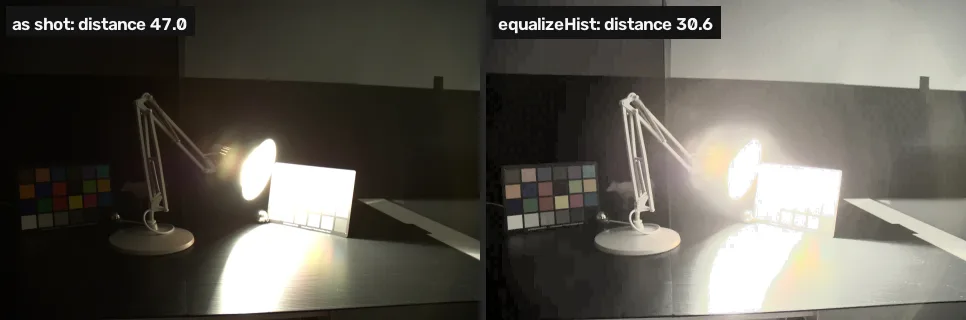
cv2.equalizeHist on its brightness. Frame from the HDR Photographic Survey [5].Where you have met it: the Auto Contrast and Auto Levels buttons in photo editors; GIMP’s Colors › Auto › Equalize.
TL;DR. Automatic equalization makes any photo use the full brightness range, which is not the same as making it look like a better exposure of the scene. On the dark photo it leaves a gap of 30.6 to the target exposure, and its local variant CLAHE 35.5, against 9.1 for a plain multiplier.
The problem
Lessons 3 and 4 of the project fixed the photo with one number chosen by comparing against the target. Most of the time there is no target. An automatic fix has to decide from the photo alone, and the obvious rule is to make the histogram flat: use every brightness level about equally.
Equalize the brightness
cv2.equalizeHist takes one 8-bit channel and remaps it so its histogram is as flat as the values allow [1, 2]. To keep the colours, it is applied to brightness alone: convert to YCrCb, whose Y channel is brightness and Cr, Cb carry the colour, equalize Y, convert back.
CLAHE, contrast-limited adaptive histogram equalization, does the same in small tiles of the image (8 × 8 by default) and caps how much any tile may stretch, so noise in flat areas is not blown up [2]. The tiled version was described by Pizer and colleagues in 1987 [4], and the contrast-limited one is Zuiderveld’s, published in 1994 [3].
import cv2
import numpy as np

img = cv2.imread("dark.webp")
ref = cv2.imread("reference.webp")

def distance(a, b):
    return np.abs(a.astype(int) - b.astype(int)).mean()

def on_brightness(img, op):
    # equalize brightness only: Y of YCrCb, colour untouched
    ycc = cv2.cvtColor(img, cv2.COLOR_BGR2YCrCb)
    ycc[..., 0] = op(ycc[..., 0])
    return cv2.cvtColor(ycc, cv2.COLOR_YCrCb2BGR)

equalized = on_brightness(img, cv2.equalizeHist)
clahe = cv2.createCLAHE(clipLimit=2.0, tileGridSize=(8, 8))
local = on_brightness(img, clahe.apply)
print("equalizeHist:", round(distance(equalized, ref), 1))
print("CLAHE: ", round(distance(local, ref), 1))equalizeHist: 30.6 CLAHE: 35.5
| Function | Arguments | What it does |
|---|---|---|
cv2.equalizeHist(channel) | one uint8 channel | flattens its histogram |
cv2.createCLAHE(clipLimit, tileGridSize) | how far a tile may stretch; the tile grid | a CLAHE object |
clahe.apply(channel) | one uint8 channel | CLAHE on that channel |
cv2.COLOR_BGR2YCrCb | — | brightness (Y) apart from colour (Cr, Cb) |
Both beat doing nothing (47.0) and both lose to a single multiplier (9.1).
def half(x):
    return cv2.resize(x, None, fx=0.5, fy=0.5)

small = [half(x) for x in (equalized, local, ref)]
cv2.imshow("equalizeHist | CLAHE | reference", np.hstack(small))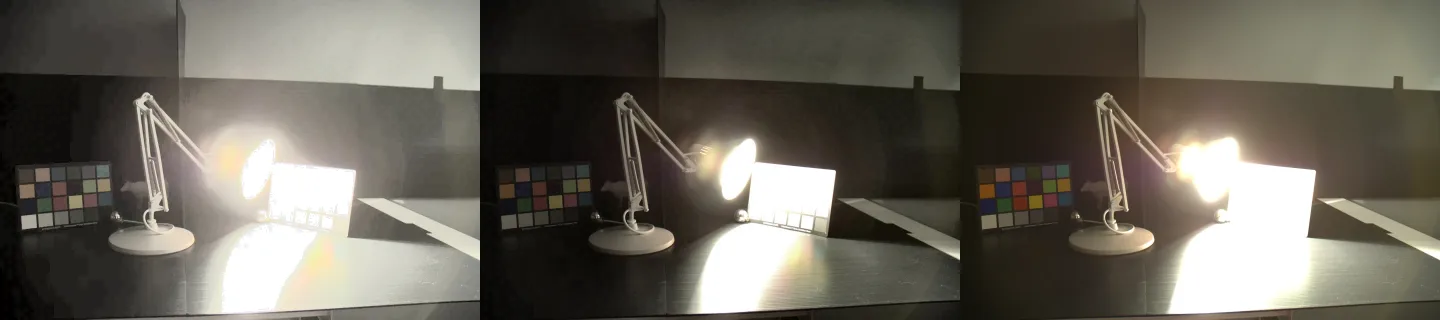
Equalization spends the brightness range on whatever is most common, and this photo is mostly dark wall and desk. Those get stretched across most of the range and turn mid-grey, while the lamp and the pool of light, a small share of the pixels, get squeezed into the top few levels. CLAHE keeps the lamp from blowing out further but lifts every dark tile on its own, so the wall and desk lose the dark-to-light fall-off the target exposure has. OpenCV’s own tutorial names this case: equalization “won’t work good in places where there is large intensity variations”, with both bright and dark pixels present [2].
Break it
equalizeHist accepts one channel only. Give it the colour image and OpenCV stops with an assertion.
# equalizeHist takes one 8-bit channel, not a colour image
cv2.equalizeHist(img)Traceback (most recent call last): File "<exec>", line 2, in <module> cv2.error: OpenCV(4.11.0) /home/runner/work/pyodide-recipes/pyodide-recipes/packages/opencv-python/build/opencv-python-4.11.0.86/opencv/modules/imgproc/src/histogram.cpp:3440: error: (-215:Assertion failed) _src.type() == CV_8UC1 in function 'equalizeHist'
The message names the check that failed, _src.type() == CV_8UC1: one channel (C1) of 8-bit unsigned values (8U).
Your turn
Apply the CLAHE object from the first cell to the grey version of img and store the result in out.
out = None  # CLAHE on the grey version of img
print(out)
When to use them
Equalization and CLAHE are the right tools when there is no target exposure to match and the goal is to see detail, or when the image feeds an algorithm that needs contrast more than realism. They are the wrong tool for restoring a photo to how it should have looked, which this project measured.
The project keeps the multiplied photo and finishes it in lesson 6.
Why this works
Flattening the histogram maps each value through the cumulative distribution of the image, so equal shares of the pixels land on equal shares of the output range [1]. That rule knows nothing about the scene, which is why it did badly here. Why the target exposure has the tone distribution it does, and why no single exposure holds the lamp and the dark desk at once, is in Noise and dynamic range and High dynamic range.
Common mistakes
- A colour image into
equalizeHist. The Break it cell. - Equalizing B, G and R separately. Each channel gets its own remap, so the colour balance shifts. Equalize brightness only.
- A large
clipLimiton a noisy image. CLAHE then amplifies the noise in flat regions, the thing the limit exists to prevent [2]. - Reading “more contrast” as “better”. An equalized photo usually looks punchier and is often further from the truth. Measure against a reference when you have one.
References
[1] Gonzalez, R. C., & Woods, R. E. (2018). Digital Image Processing (4th ed.), section 3.3 “Histogram Processing”, Histogram Equalization, p. 148, and Local Histogram Processing, p. 173. Pearson.
[2] OpenCV. Histograms - 2: Histogram Equalization (Python tutorial, doc/py_tutorials/py_imgproc/py_histograms/py_histogram_equalization/py_histogram_equalization.markdown). OpenCV 4.11.0, commit 31b0eee. github.com/opencv/opencv
[3] Zuiderveld, K. (1994). Contrast Limited Adaptive Histogram Equalization. In Graphics Gems (ISBN 978-0-12-336156-1), pp. 474–485. Elsevier. doi:10.1016/B978-0-12-336156-1.50061-6
[4] Pizer, S. M., Amburn, E. P., Austin, J. D., Cromartie, R., Geselowitz, A., Greer, T., ter Haar Romeny, B., Zimmerman, J. B., & Zuiderveld, K. (1987). Adaptive histogram equalization and its variations. Computer Vision, Graphics, and Image Processing, 39(3), 355–368. doi:10.1016/S0734-189X(87)80186-X
[5] Fairchild, M. D. (2007). The HDR Photographic Survey. IS&T 15th Color Imaging Conference, pp. 233–238. doi:10.2352/CIC.2007.15.1.art00044