
Why it works: Unit 1.2: Image sensing, Unit 1.3: The image as data
Gamma Correction in OpenCV with a Lookup Table
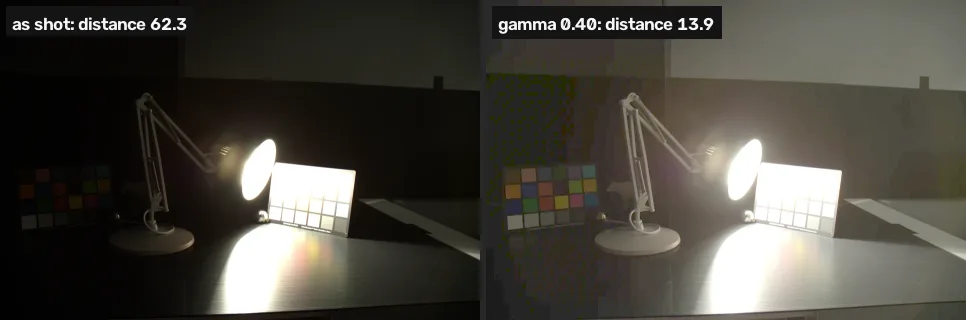
Build a 256-entry lookup table and apply it with cv2.LUT to brighten dark tones more than bright ones. Two stops dark, multiplying wins (9.1 against 10.7); three stops dark, gamma wins (13.9 against 15.1).
Gamma correction brightens the dark parts of a photo more than the bright parts, so shadows open up without the highlights burning out.
Where you have met it: the Gamma setting in games and in monitor menus; the middle slider of the Levels tool in GIMP and Photoshop, which is a gamma control.
TL;DR. A gamma curve lifts shadows harder than highlights and never pushes a value past white, which makes it the better fix when a photo is very dark. Two stops under, multiplying still wins (9.1 against 10.7); three stops under, gamma wins (13.9 against 15.1).
The problem
Lesson 3 fixed the photo that is two stops dark by multiplying every value by 2.4. The project has a darker one too, shot at 1/2 second, more than three stops short of the 5-second target. Multiplying it by 4.2 is the best a gain can do, and anything that started above 60 ends up at 255: the gain that rescues the shadows destroys everything else. The cell further down counts it.
A lookup table
Gamma correction maps each value through a power curve: divide by 255 so it runs from 0 to 1, raise it to γ, multiply by 255 again [1]. A γ below 1 brightens, above 1 darkens, and 0 stays 0 while 255 stays 255 at every γ [2].
With only 256 possible input values, the curve is computed once into a table of 256 answers, and cv2.LUT replaces every pixel by its entry. That is how any fixed per-value map (gamma, contrast curves, colour grading) is applied fast.
import cv2
import numpy as np

ref = cv2.imread("reference.webp")

def distance(a, b):
    return np.abs(a.astype(int) - b.astype(int)).mean()

def gamma(img, g):
    table = (np.arange(256) / 255) ** g * 255
    table = table.round().astype(np.uint8)
    return cv2.LUT(img, table)

for name, g, a in [("dark.webp", 0.55, 2.4),
                   ("darker.webp", 0.40, 4.2)]:
    img = cv2.imread(name)
    by_gamma = distance(gamma(img, g), ref)
    by_gain = distance(cv2.convertScaleAbs(img, alpha=a), ref)
    print(name, "gamma", g, round(by_gamma, 1),
"| times", a, round(by_gain, 1))dark.webp gamma 0.55 10.7 | times 2.4 9.1 darker.webp gamma 0.4 13.9 | times 4.2 15.1
| Function | Arguments | What it does |
|---|---|---|
np.arange(256) | — | the 256 possible inputs, 0 to 255 |
cv2.LUT(img, table) | an 8-bit image, a 256-entry table | replaces each value v with table[v], per channel |
On the photo two stops dark, the multiplier is still slightly ahead. On the one three stops dark, gamma is ahead. The further the photo is from the target, the more it matters that gamma never clips.
darker = cv2.imread("darker.webp")
times = cv2.convertScaleAbs(darker, alpha=4.2)
for name, x in [("as shot", darker), ("times 4.2", times),
                ("gamma 0.40", gamma(darker, 0.40))]:
    share = (x.max(axis=2) == 255).mean()
    print(name, "- at 255:", round(100 * share, 1), "%")
def half(x):
    return cv2.resize(x, None, fx=0.5, fy=0.5)

small = [half(x) for x in (times, gamma(darker, 0.40), ref)]
cv2.imshow("times 4.2 | gamma 0.40 | reference", np.hstack(small))as shot - at 255: 6.2 % times 4.2 - at 255: 14.4 % gamma 0.40 - at 255: 6.4 %
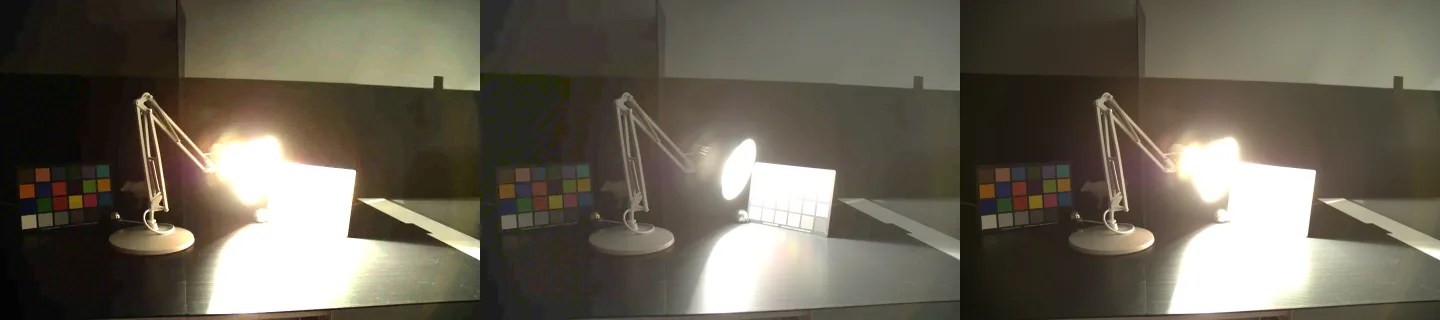
Multiplying by 4.2 takes the share of pixels at 255 from 6.2% to 14.4%, while gamma moves it only to 6.4%: the multiplied version (left) has lost the lamp, the card and the pool of light to solid white. The gamma version keeps the card’s edges and the lamp’s rim, and its shadows are lighter and flatter than the target’s, which is where its remaining distance comes from.
Lesson 5 tries the automatic alternative, which picks the curve from the histogram instead of from a target.
Break it
The formula only works on values between 0 and 1. Raise 0–255 values to the power directly and the brightest pixel, 255, becomes 2550.40, about 9.
# Raising 0-255 values to a power without scaling to 0-1 first
wrong = darker.astype(float) ** 0.40
wrong = np.clip(wrong, 0, 255).astype(np.uint8)
print("largest value after the wrong gamma:", wrong.max())
cv2.imshow("gamma on 0-255 instead of 0-1", wrong)largest value after the wrong gamma: 9

The whole image collapses into near-black.
Your turn
A γ above 1 darkens. Choose a γ that brings the overexposed bright.webp within 36 of the target.
# choose a gamma that darkens bright.webp toward the target
g = 1.0
print(round(distance(gamma(cv2.imread("bright.webp"), g), ref), 1))
Why this works
A camera’s developed picture is already the raw light passed through a curve of this shape, and The response curve measures that curve on this same lamp scene. Applying another power curve bends the tones further in the same way, which is why a single γ can undo much of an exposure error that a straight multiplier cannot. The cost is visible in Quantization and bit depth: stretching the darkest few levels of an 8-bit photo over a wider range spreads 256 levels thin, and smooth gradients can band.
Common mistakes
- Forgetting the
/ 255. The Break it cell. - Building the table as floats.
cv2.LUTwants a table of the same type as the image; build it asuint8, as the cell does. - Mixing up which way γ goes. In this formula γ below 1 brightens. Some tools define gamma the other way round (as 1/γ), so check what a slider means before copying its number.
- Expecting gamma to bring back clipped highlights. 255 maps to 255 at every γ.
References
[1] OpenCV. Changing the contrast and brightness of an image!, section “Gamma correction” (tutorial, doc/tutorials/core/basic_linear_transform/basic_linear_transform.markdown). OpenCV 4.11.0, commit 31b0eee. github.com/opencv/opencv
[2] Gonzalez, R. C., & Woods, R. E. (2018). Digital Image Processing (4th ed.), section 3.2 “Some Basic Intensity Transformation Functions”, Power-Law (Gamma) Transformations, p. 139. Pearson.
[3] Fairchild, M. D. (2007). The HDR Photographic Survey. IS&T 15th Color Imaging Conference, pp. 233–238. doi:10.2352/CIC.2007.15.1.art00044